Arova

For villas, guesthouses and apartments

Your reception, on autopilot

Arova answers every guest on WhatsApp and email in their own language, takes the booking and the payment, issues the Romanian paperwork, sends the door code and gets the house ready — day and night, without a reception desk.

1 month free, then €49 a month · everything included

About 6 minutes: everything Arova does, on the demo villa — feature by feature

💬
No guest left waitingThe AI drafts every reply — or sends it — day and night, in the guest's language
💳
Book and pay onlineCard, Apple Pay, holiday cards or bank transfer — 50/50 for early bookings
🧾
The paperwork, doneID read from a photo, proforma, invoice, e-Factura and the arrival form
🔑
The house runs itselfA key box PIN per booking, heating, gate, cameras and the TV welcome
🎯
More nights soldWin back leads, offer guests one more night, a waiting list for full dates
📈
Priced against the marketWhat the places next door charge and what their guests say

The numbers · One year at Vila Peștera

181 hours a year back — 22 working days

Counted from a real year at Vila Peștera, a four-bedroom villa in Moieciu: about 25 stays, 160 WhatsApp conversations and every bill, proforma and door code that comes with them.

970guest messages a year, 72 of them asking to book
2 minthe owner's median reply time — always holding the phone
−181 ha year: 206 hours by hand, 25 with Arova
8,400 €a year for one minimum-wage employee — who still doesn't cover weekends

How we got to these numbers →

What Arova does

One app for the whole front office

Most owners stitch together a PMS, a messaging tool, an invoicing app, a check-in tool and a smart-lock app. Arova is all of it — built around direct guests, WhatsApp and the house itself.

New · Self-booking · Card payments

Guests book and pay on their own — day or night

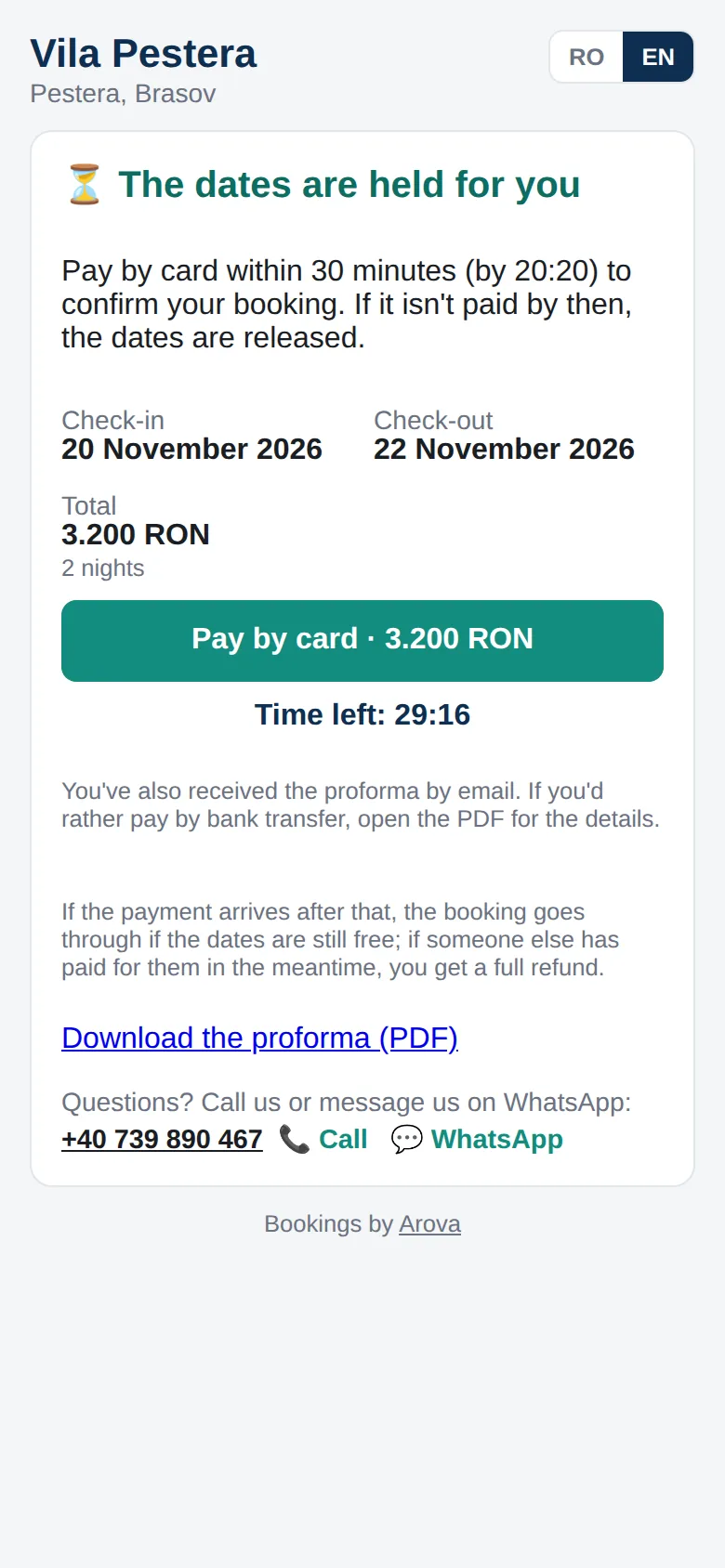
A booking page with your free nights and prices — on your own website and as a link the bot sends on WhatsApp, with the guest's dates already filled in. The guest picks the nights, sees the exact total and pays by card, Apple Pay or Google Pay — or by bank transfer, with the proforma that arrives by email straight away. Once it's paid, the booking is made: the dates blocked (and closed on Booking.com and Airbnb), the cleaning team told and the welcome message sent.

  • Your photos and a map on top — guests see at once it's really your place
  • Free nights with each night's price, minimum stays, Romanian or English
  • The dates held for 30 minutes while the guest pays; unpaid, they open again
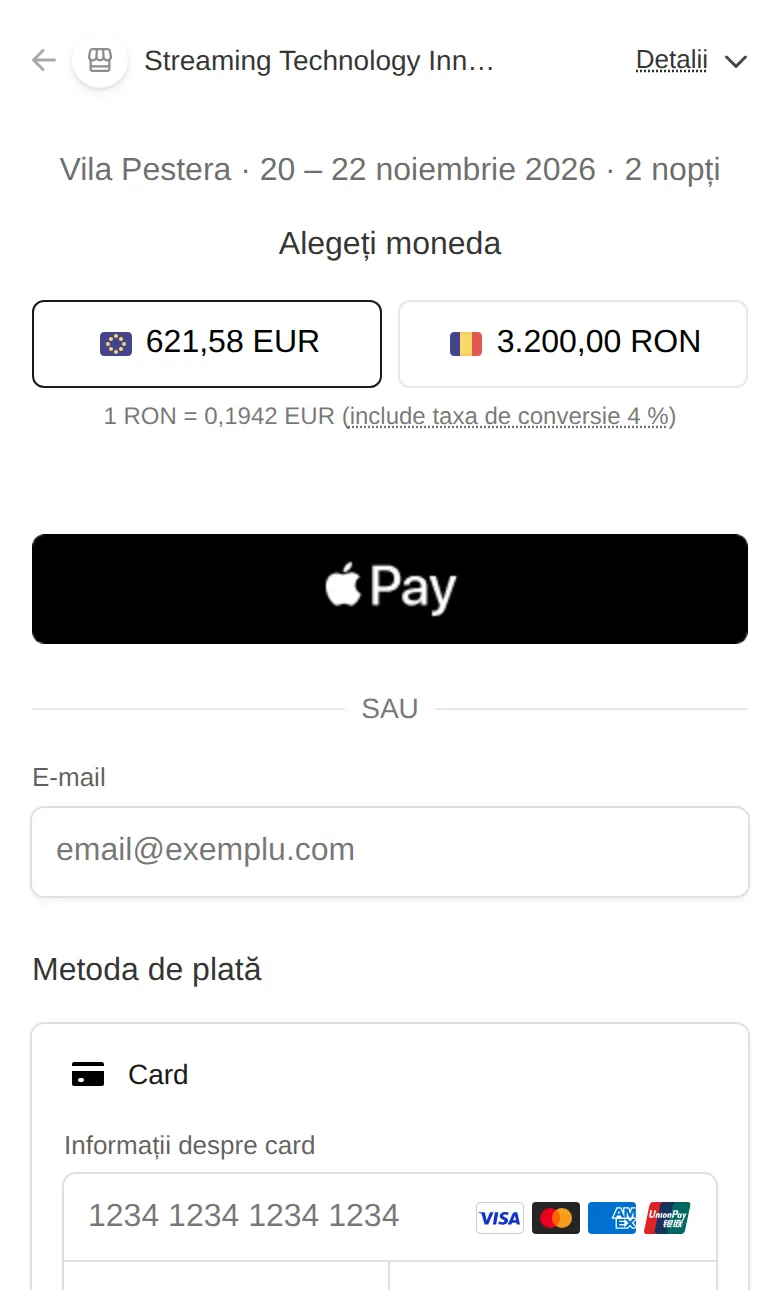
  • Card, Apple Pay and Google Pay through Stripe, straight into your own account
  • The proforma emailed at once — bank details and the card link on it
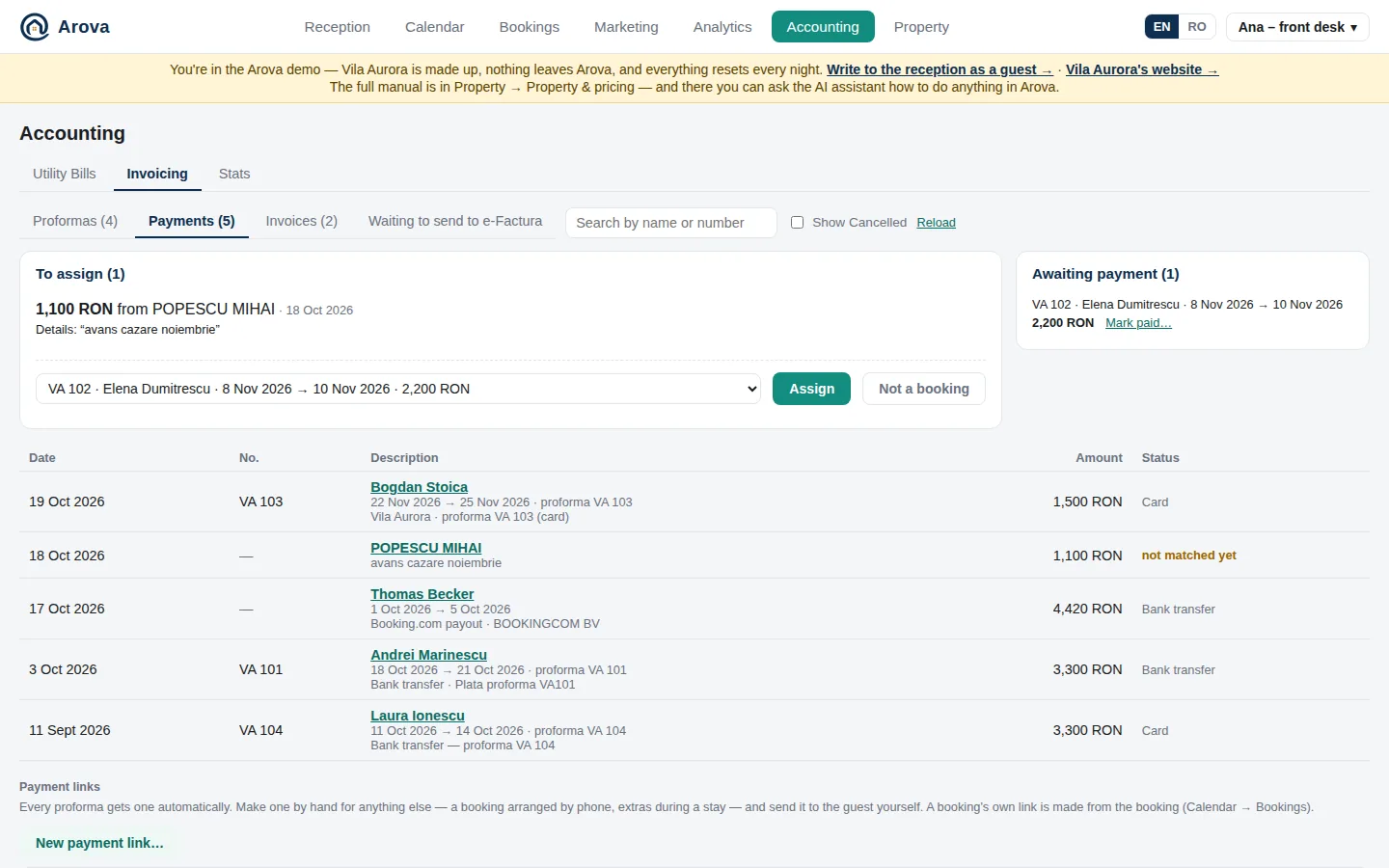
  • Bank transfers read from your bank's emails and matched to their booking
  • Invoice to a company: the CUI checked at ANAF, the name filled in
  • A payment that arrives late still books the dates, if they're free
  • Questions? The property's phone and WhatsApp on every step
  • How many opened the link and left without booking, counted for you
  • On the phone with a guest? Reception makes the link for their dates in a tap — Copy, Share or WhatsApp
  • Booking.com and Airbnb payouts matched to the stay they pay; card payments listed with the bank transfers
  • Money from your own company (your monthly settlement, say) never taken for a guest's payment
  • Booking 10 days ahead or more? 50% now, the rest a week before check-in
  • Dates taken? Join the waiting list — told as soon as they free up
  • Paid? The invoice is issued and sent to the guest at once, and goes to e-Factura by itself 48 hours later (or as a draft in SmartBill)
  • In this demo the invoice really goes to ANAF's e-Factura test system — press Send to e-Factura now and see it accepted
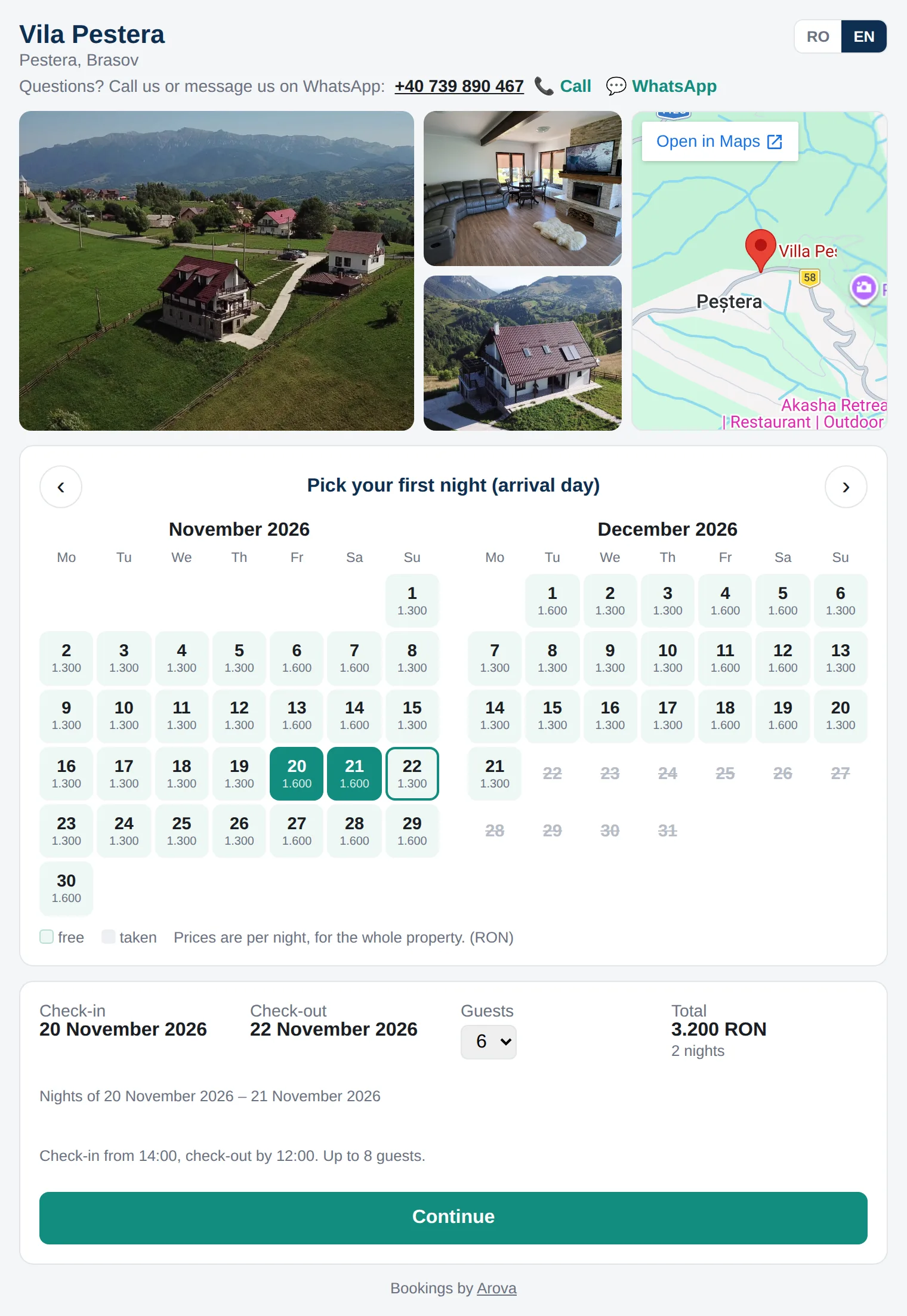
The booking page: the property's photos and its map on top, two months of free nights with their prices, two nights picked, the total and Continue After Book: the dates held for 30 minutes, Pay by card, and the proforma by email for a bank transfer Stripe's payment page on a phone: Apple Pay or card

The booking page with your photos and map, the dates held while the guest pays, and Stripe's payment page with Apple Pay.

Accounting → Invoicing → Payments: a transfer to assign, a Booking.com payout and a bank transfer matched automatically, card payments, the bookings awaiting payment
Accounting → Invoicing → Payments: bank transfers matched to their booking by the proforma number, the amount or the payer's name — or picked by you. Example data.
New · Affiliates

Partners who send you guests — and a commission that counts itself

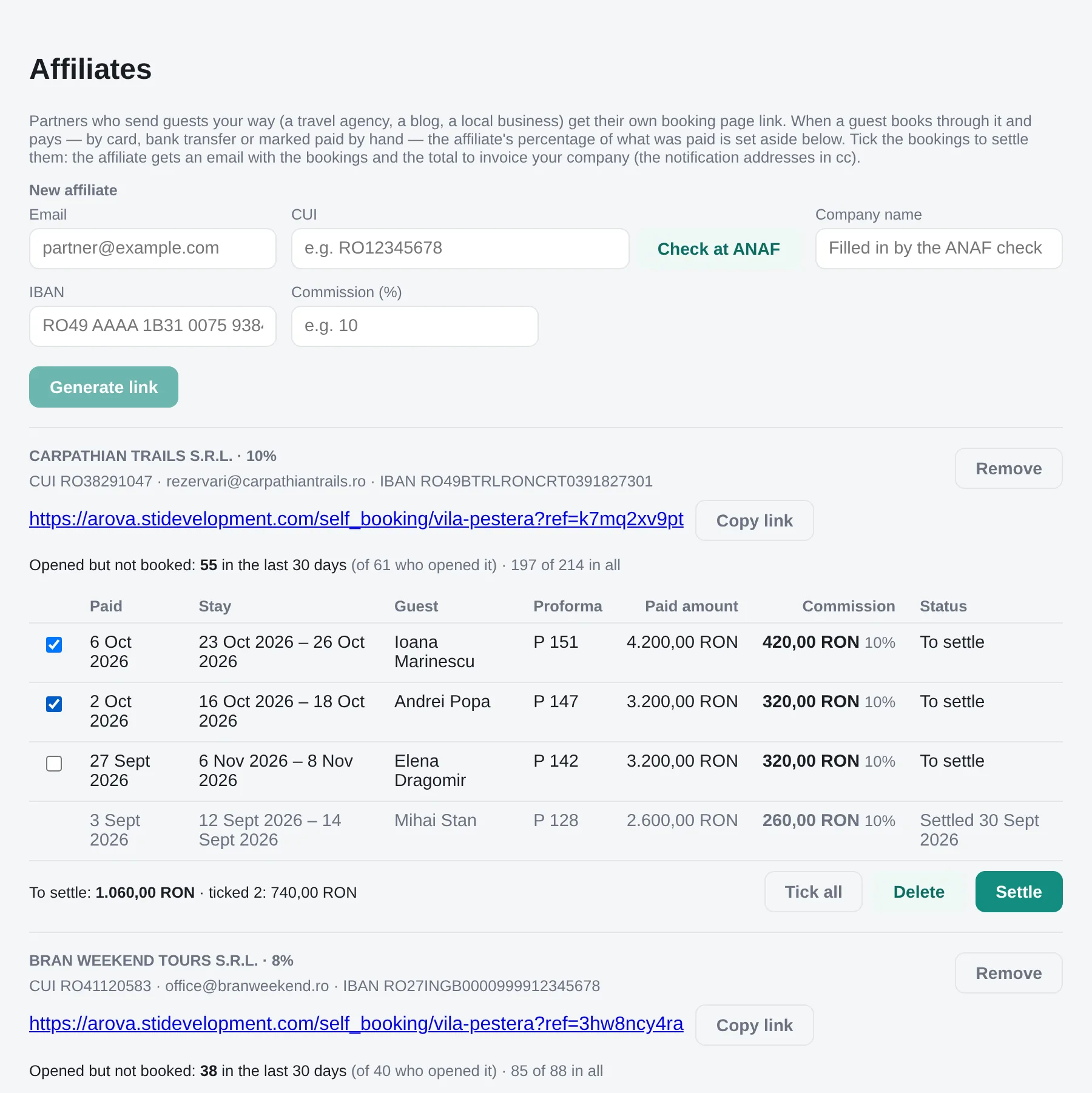
A travel agency, a local guide, a blog, the restaurant down the road: give each one their own booking page link. When a guest books through it and pays — by card, bank transfer or marked paid by hand — the partner's percentage is set aside by itself, and they get an email saying so. Tick the bookings and press Settle: the partner gets the list of stays and the total to invoice your company, with your details ready to copy.

  • Onboard in a minute: email, company, CUI checked at ANAF, IBAN and the percentage
  • A link of random characters — nothing on it names the partner
  • Next to every link: how many opened it and how many left without booking
  • The commission on what was actually paid, refunds taken off
  • The partner emailed on every payment: the stay's dates and their commission
  • Your team told too: "came through an affiliate, 10% commission"
  • Settle or delete with a tick — settled ones stay as a record
  • Guests' names never reach the partner — only the stays
  • A discount for the partner's guests, taken off the total on the booking page and the proforma
  • A WhatsApp chat from the partner's link is theirs: the AI quotes the discount and sends their link
  • It works both ways: put a partner's poster on the TV in every room, as an image slide in Smart Guest Home → TV screen
57 seconds: a partner's link from start to commission, and the partner's offer on your TVs — real screens from this demo.
Property → Self Booking → Affiliates: a new partner's form with the ANAF check, each partner's link with its visits, and the paid bookings with their commission, ready to settle
Property → Affiliates: the partners, their links and visits, and the commission on each paid booking. Example data.
To: rezervari@carpathiantrails.ro
Cc: you
Subject: Vila Pestera commission: 740,00 RON to invoice (2 bookings)

Your commission for the paid bookings made through your Vila Pestera booking link:

  • 16 – 18 October 2026 (proforma P 147): 3.200,00 RON × 10% = 320,00 RON
  • 23 – 26 October 2026 (proforma P 151): 4.200,00 RON × 10% = 420,00 RON

Total to invoice: 740,00 RON

Please invoice: your company's name, CUI, Reg. Com., address, bank and IBAN — from Property → Accounts.

Press Settle: the email the partner gets (in Romanian and English) — stays and amounts, no guest names. Example data.
Reception

Every guest message in one place, with the answer already written

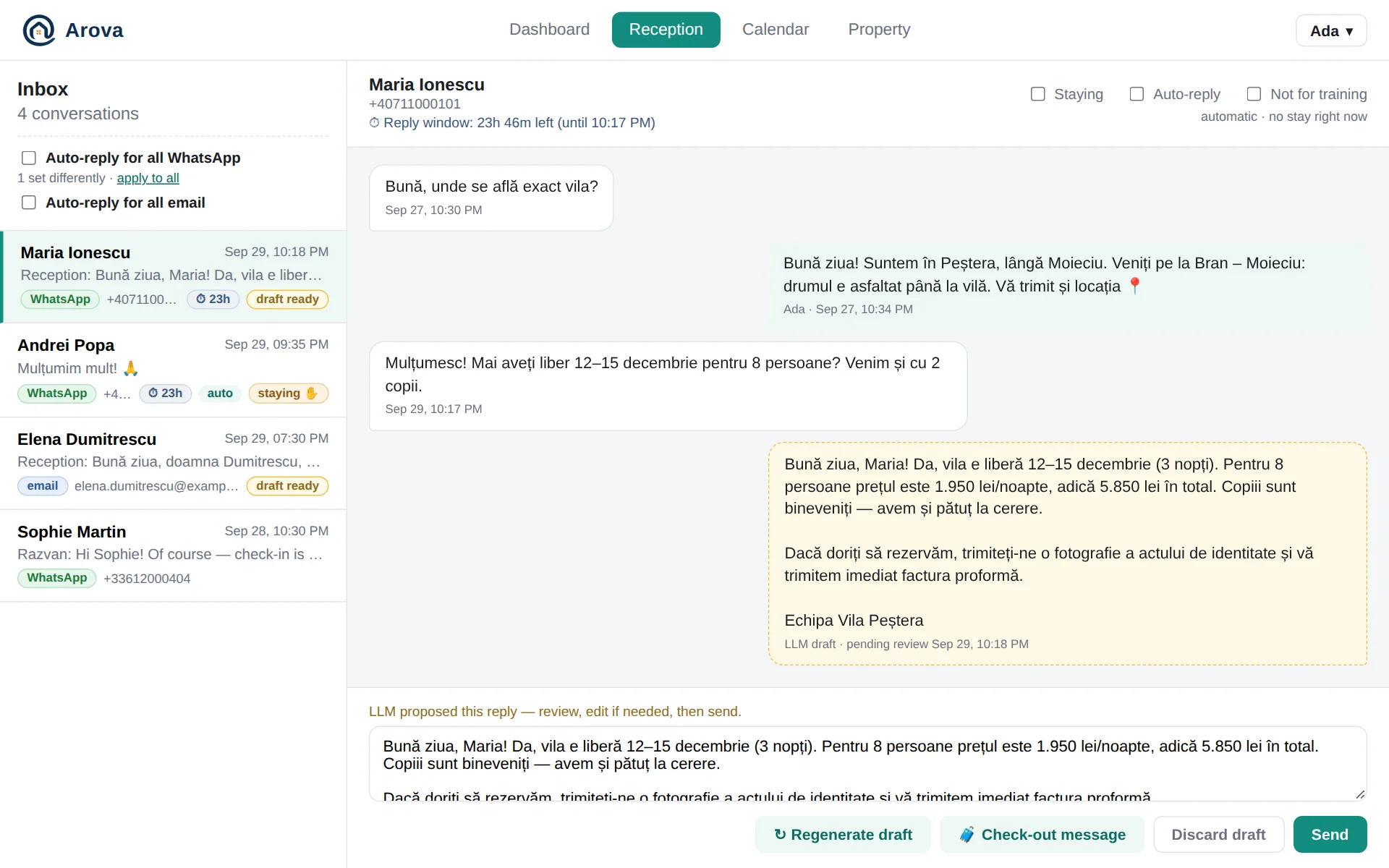
WhatsApp, the property's own mailbox and the booking and contact forms on your website all land in one inbox. For every message, the AI writes a reply grounded in the property: live availability and the exact price for the dates asked about, minimum stays, house rules, your terms and conditions, directions — in the guest's own language.

  • Review, edit and send — or switch on auto-reply per conversation, or for a whole channel
  • A guest who writes in German, Russian or Italian? Every message translated under it — you write in your language, it goes out in theirs
  • Refunds, rescheduling and personal data answered from your own terms and conditions
  • No message lost: if the server is ever down, Arova fetches what it missed from WhatsApp
  • WhatsApp's 24-hour reply window counted down on each conversation
  • The check-out instructions in one tap — as your approved WhatsApp template when the window has closed
  • Photos, videos and voice messages right in the thread
  • 📎 Send a file — the invoice, a map — on WhatsApp while the window is open, or by email any time
  • A failed WhatsApp message shown in red, with why it wasn't delivered
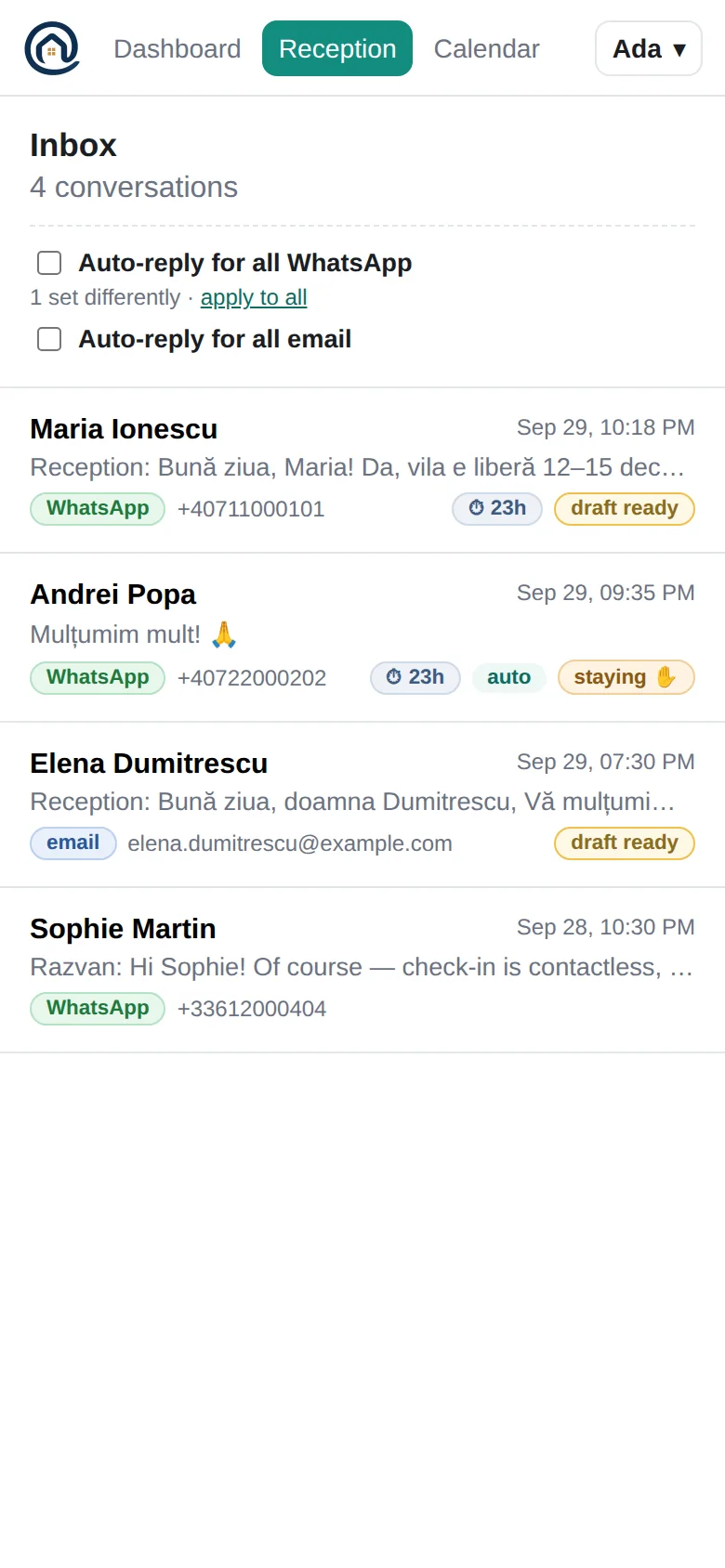
Reception: the inbox and a conversation with an AI draft waiting for review
A booking inquiry with the AI's draft waiting for review.
Marketing · Leads

Win back the guests who asked and didn't book

Most inquiries never turn into a booking — and nobody writes to them again. Arova does: for each open weekend or holiday it finds the people who asked about those dates and didn't book, and your past guests, and writes them a short, warm message offering the free dates. You edit it, choose who gets it and press Send.

  • Ask for any list in your own words — "past guests who asked about New Year's Eve", "now only WhatsApp"
  • Sent by SMS to WhatsApp guests, pointing back to WhatsApp, and by email to email guests
  • Nobody gets two Marketing messages within 30 days
  • Never to anyone marked "No marketing" or who replied STOP
  • Add a phone number or email by hand; open anyone's conversation from the list

Find leads

Past guests and leads who asked about New Year's Eve and never booked
I found 14 people who asked about 30 Dec – 2 Jan in the last two months, plus 6 past guests. 20 people · left out: 2 marked No marketing · 1 messaged in the last 30 days
Andrei P.Ioana M.Mihai & ElenaCristina D.+16
Message · SMS and email
Hi {name}! The villa is still free for New Year's Eve, 30 Dec – 2 Jan. Write to us anytime.
20 recipients · edit before sendingSend
Marketing · Prices

Know what the villas next door charge — and what to do about it

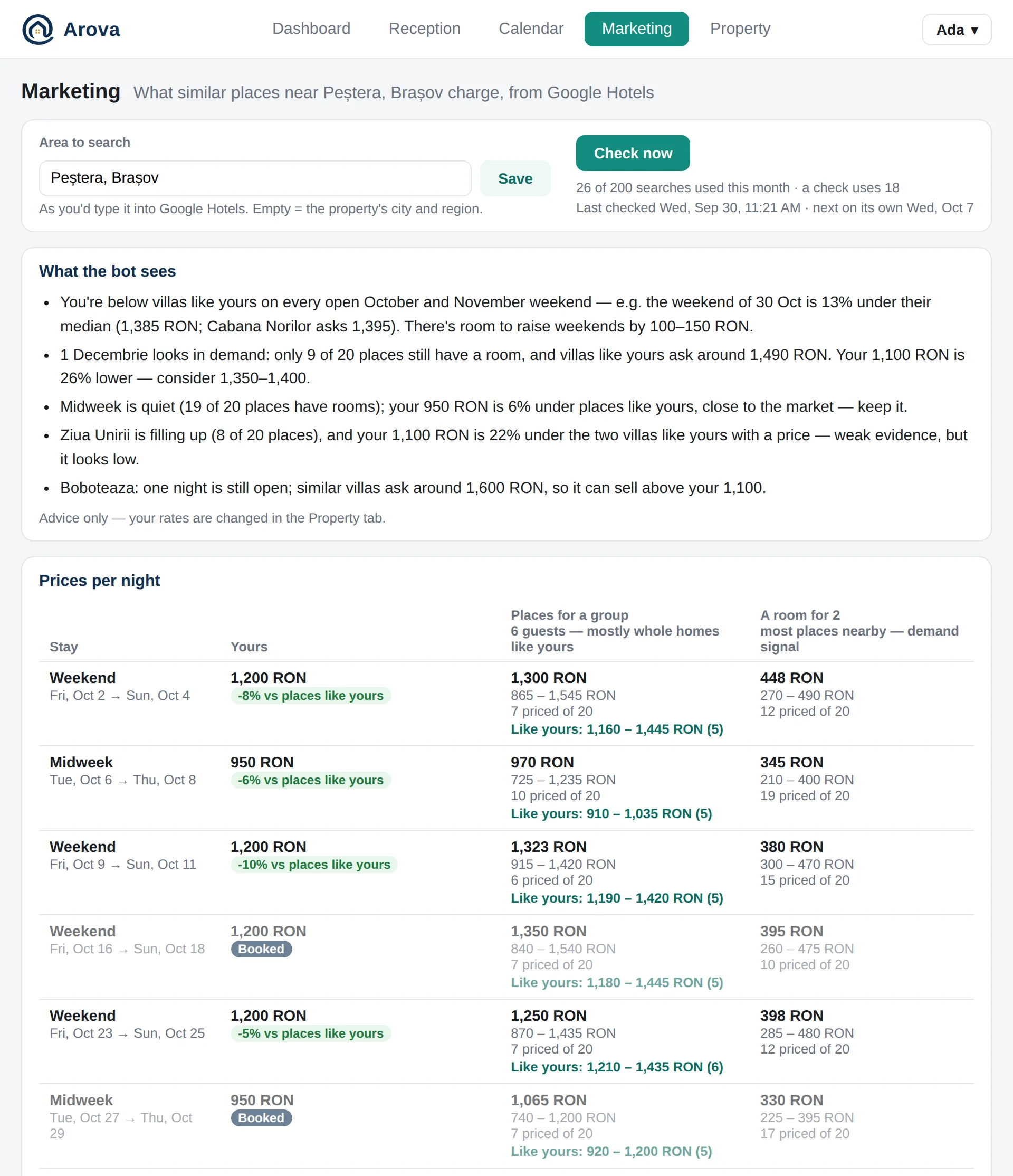
Every week Arova checks Google Hotels for the dates that matter — the next weekends, the holidays and a few midweek stays — and puts what your competitive set charges next to your own rates. Then it recommends one move per open stay: raise, keep, lower or wait — from the market, your calendar and the days left.

  • Your price against places like yours, for every date
  • How full the area is, from how many places still have a room
  • No discounts far from the date, no price moves on thin data
  • A Facebook / Instagram post written for you every week
  • What competitors post on Instagram, Facebook and TikTok, and what works for them
  • Advice only: your rates change only when you change them
The Marketing tab: the bot's advice and prices per night next to similar places
The bot's read, and each date's prices next to yours.
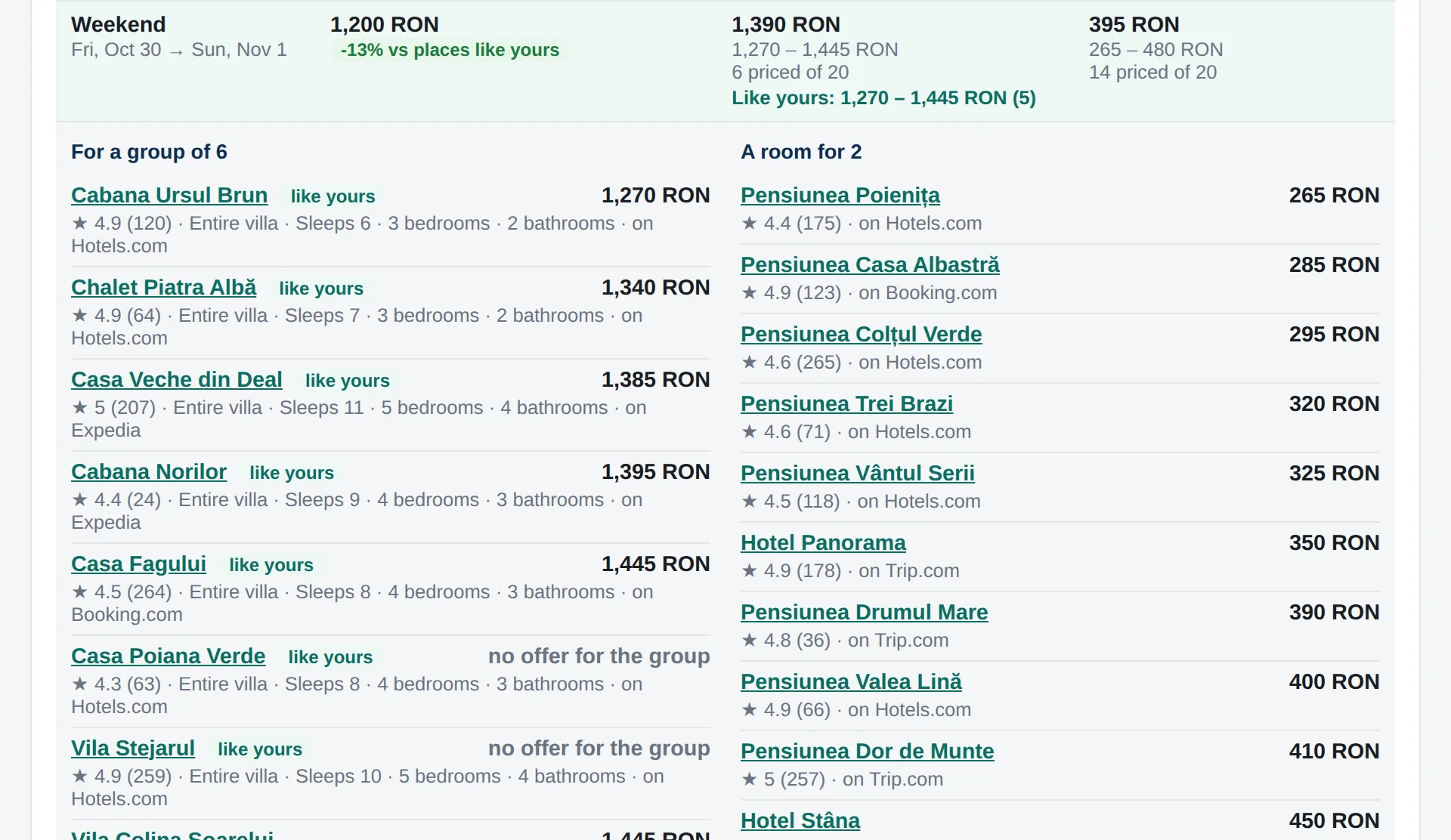
One weekend opened: the places found for a group and rooms for two, with prices and ratings
Open a date to see the places found, with ratings and where they're sold.
New · Marketing · Reviews

What guests say about you — and about the places next door

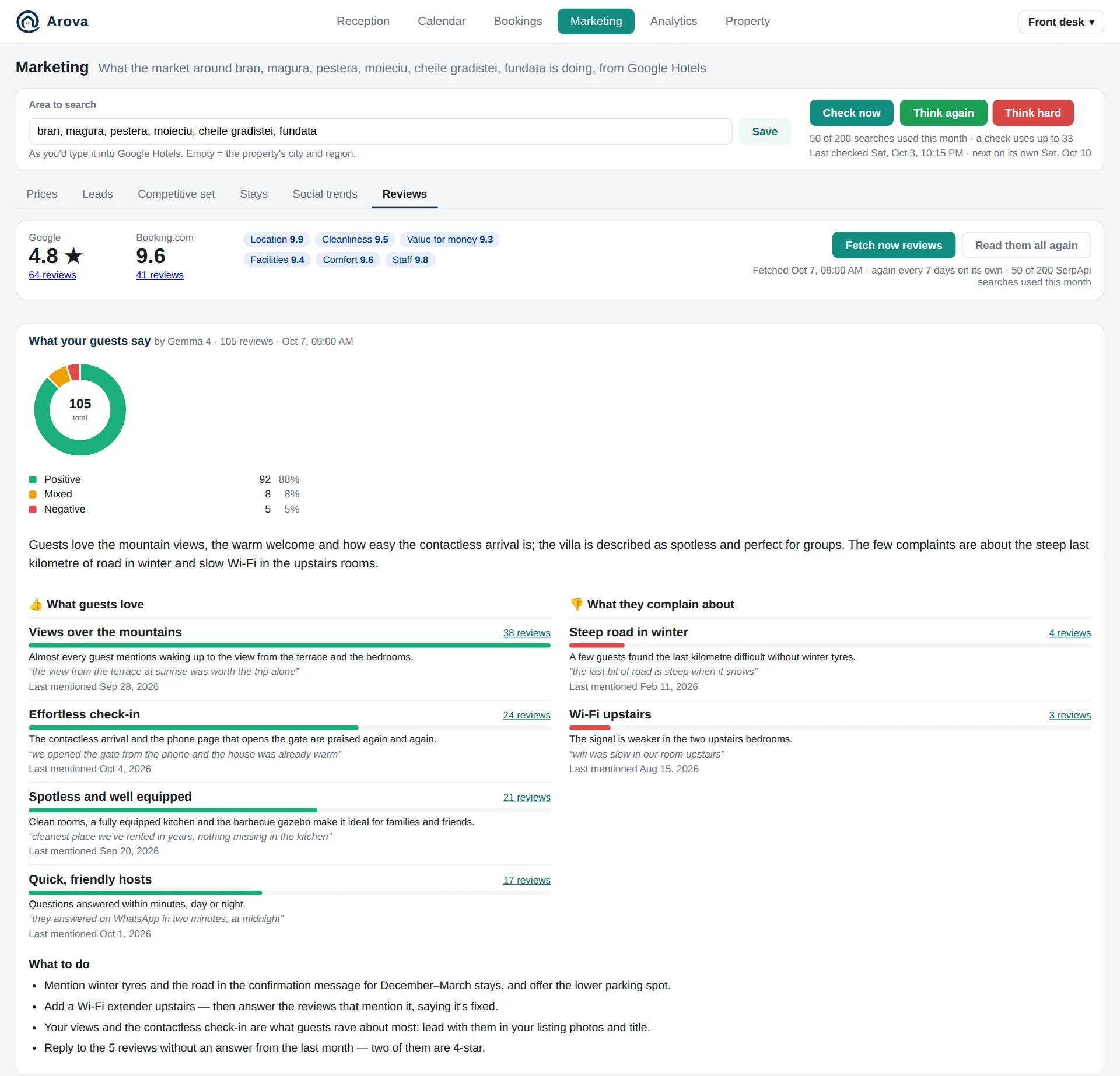
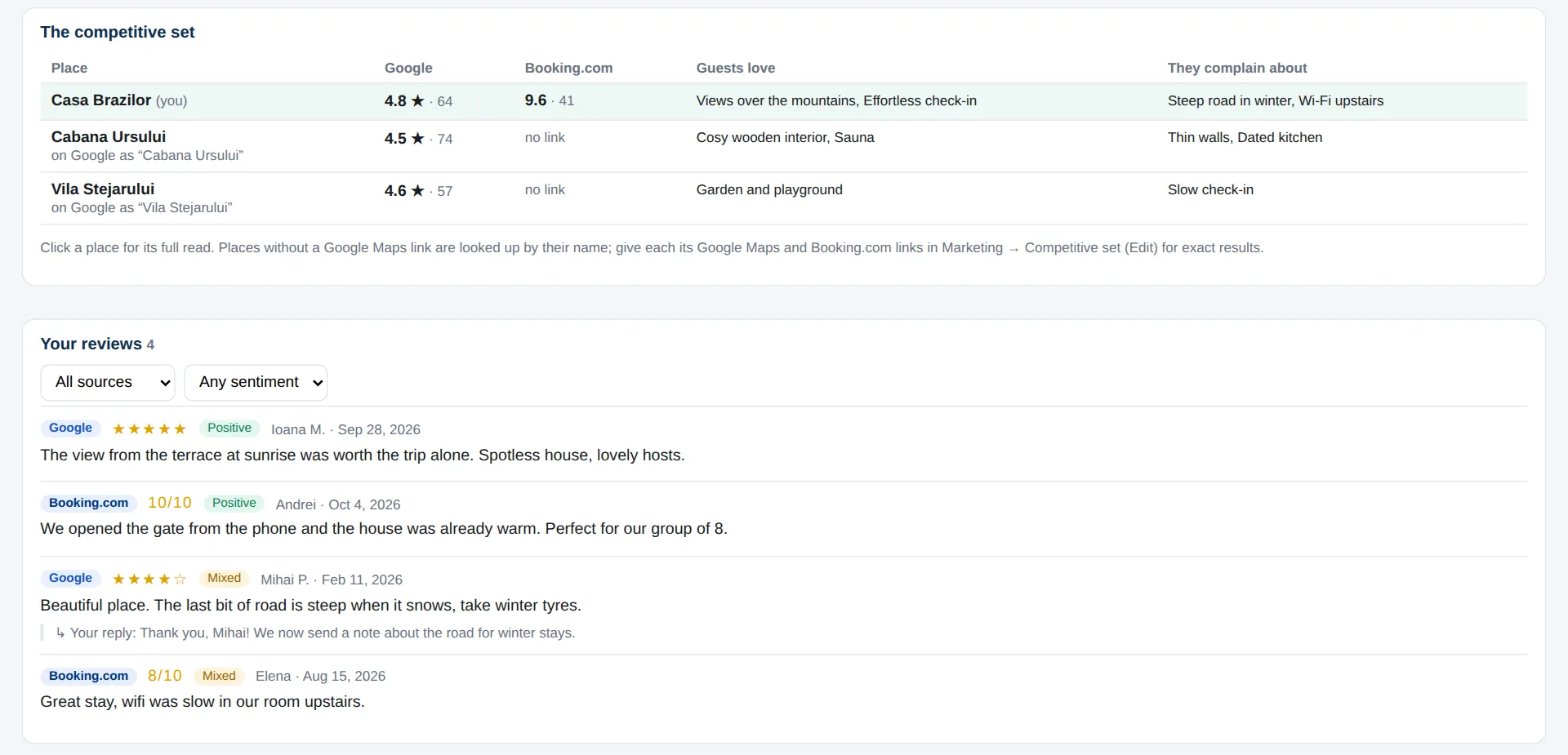
Every week Arova reads your Google and Booking.com reviews, and those of your competitive set. The AI sums up what guests love and what they complain about — how often, how recently, in their own words — and recommends what to do: what to fix, which reviews to answer, what to put first in your listing.

  • Positive, mixed and negative at a glance, from both sites
  • Each theme with how many reviews mention it, and a quote
  • Concrete recommendations, from your reviews and the competitors'
  • Your competitive set side by side: their ratings, what their guests love and miss
  • New reviews fetched by themselves every week
  • Every review, filtered by site and sentiment, with your replies
Marketing → Reviews: ratings, the share of positive reviews, what guests love and complain about, and what to do
What guests love, what they complain about, and what to do. Example data.
The competitive set compared, and the reviews themselves with the owner's replies
Your competitive set side by side, and every review with your reply.
Analytics

How the month really went — and what to do next

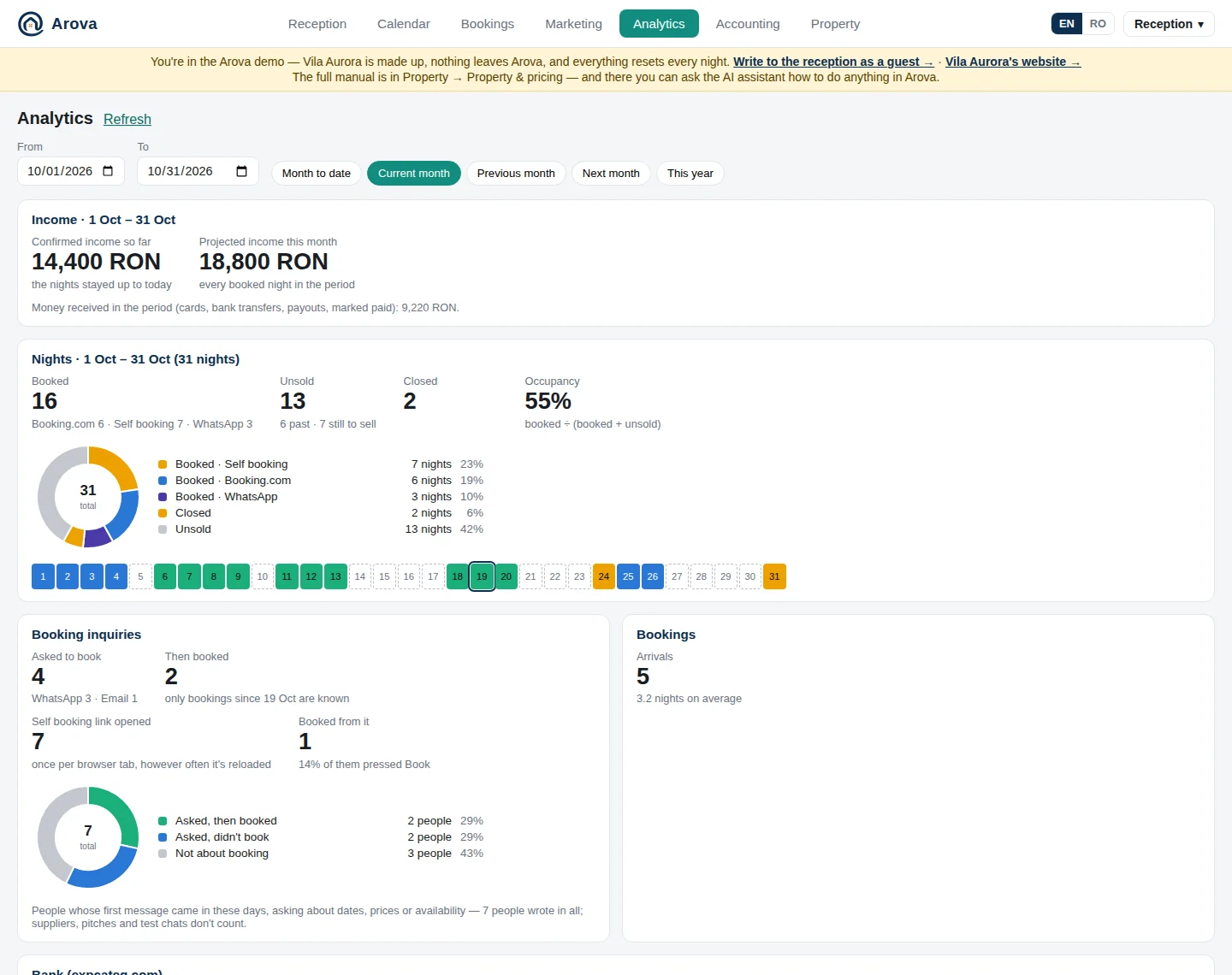
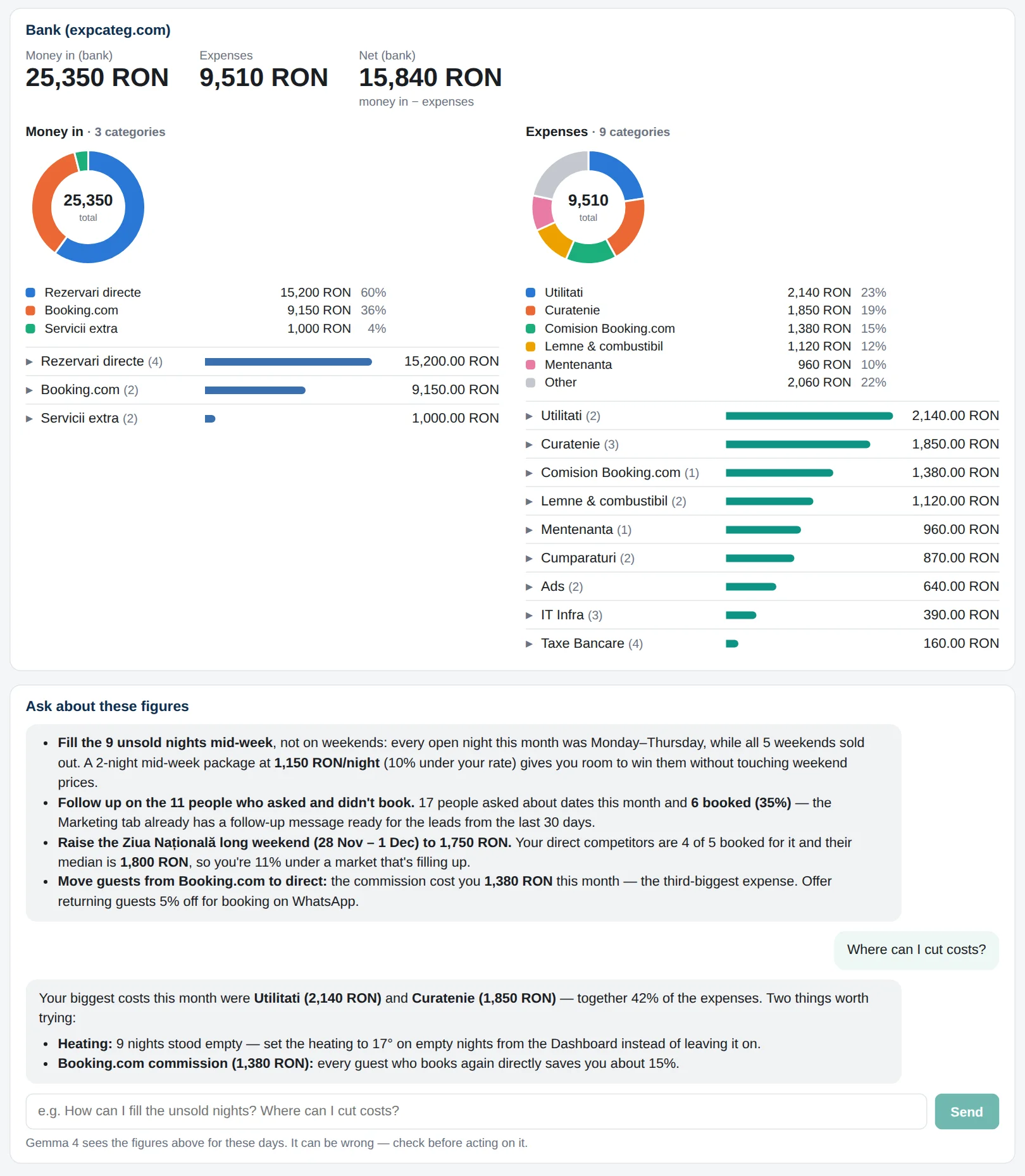
Pick any period — this month, last month, the year so far — and see how many nights you sold and through which channel, how many stayed empty, how many people asked to book and how many of them did. Connect expcateg.com and your bank statements join in: money in and expenses by category, down to each transaction.

  • Nights booked, unsold and closed, night by night, with occupancy
  • Confirmed income so far and projected income for the month — a booking without a price estimated at your rates
  • Booking inquiries told apart from suppliers and pitches, and how many booked — the self booking link's opens and bookings too
  • Money in and expenses by category, from your bank statements (expcateg.com)
  • An AI advisor opens with 3–4 recommendations and answers your questions
  • It reads your Marketing findings too: competitors' prices and what's filling up
The Analytics tab: nights booked by channel, unsold and closed, booking inquiries and booked value for a month
A month at a glance: every night, every channel, every inquiry.
Money in and expenses by category from the bank statements, and the AI advisor's recommendations
The bank side, and an advisor that turns it all into next steps.
Bookings & calendar

From "is it free?" to a paid invoice, in one chat

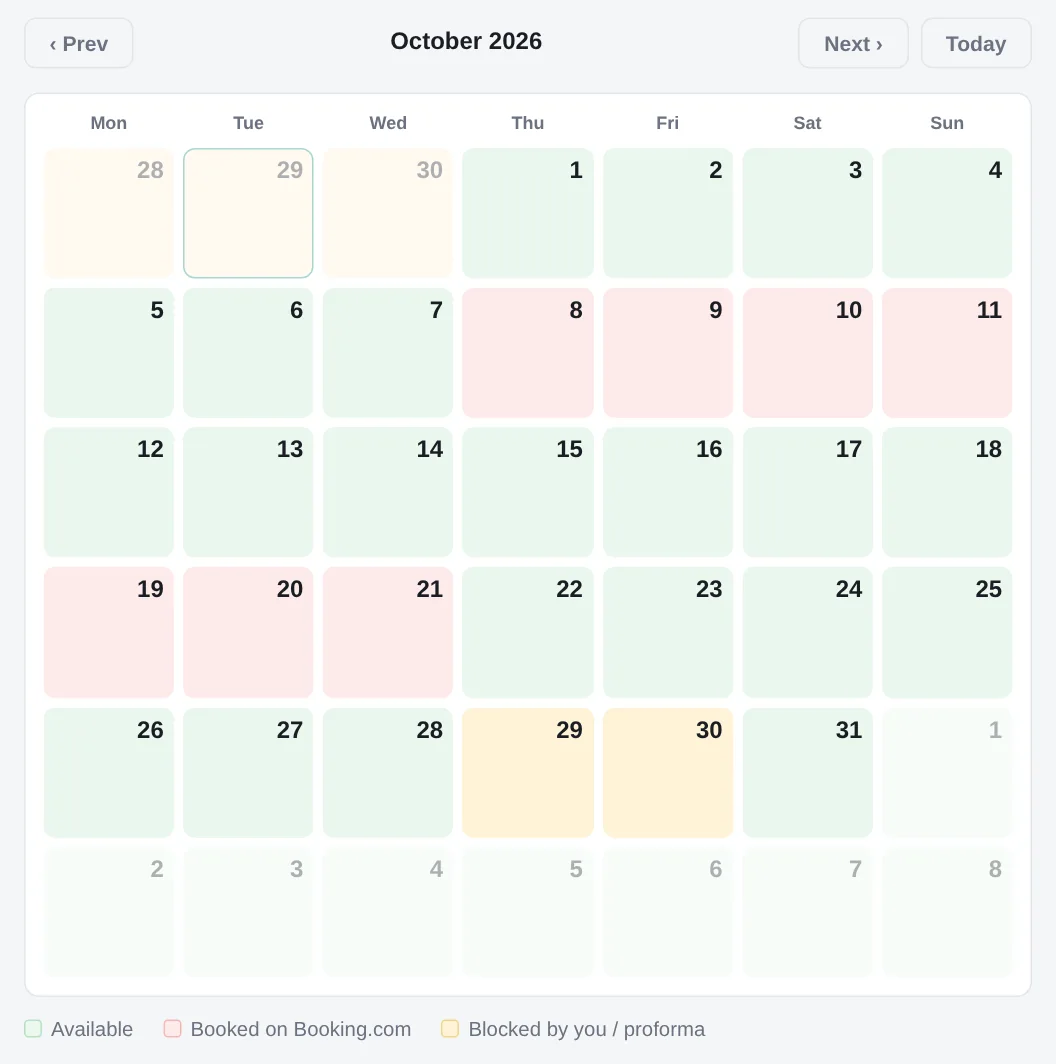
When a guest settles on dates, they send a photo of their ID or passport. Arova reads it, asks for anything missing, issues the proforma invoice as a PDF and blocks the dates — on Booking.com and Airbnb too, through the calendar links they import.

  • A price and a minimum stay for any day; legal holidays marked and priced as weekends
  • Sell directly the days you've closed on Booking.com — at your price, without the commission
  • A booking window: guests book only as many months ahead as you choose
  • ID photos and scanned PDFs read automatically, stored privately
  • Anything that isn't a readable ID — a view, a video, a voice message — pauses auto-reply and alerts the team
  • Airbnb reservations come in by themselves — and follow when they're moved or cancelled
  • Bookings from anywhere — phone, walk-in, Booking.com, Airbnb — in one list
  • Proformas in instalments: the first now, each later one issued and sent by itself on the day you pick
  • Cleaning nights closed before and after every booking, by themselves — never over another guest's nights
  • Over a long holiday weekend, a minimum stay of 3 nights — worked out from Romania's legal holidays
  • Cancel a booking in one click: the nights open again, its proformas and instalments void
The calendar: dates booked on Booking.com and Airbnb and blocked in Arova
The calendar: Booking.com and Airbnb bookings and dates blocked in Arova, synced both ways.
Team app

The whole team, on their own phones — the cleaners too

Arova installs as an app on Android and iPhone — no store needed. Everyone signs in with the property's account and names their device, so the inbox shows who answered what. Guests only ever see the property.

  • A notification for every guest message; tap it to open the conversation
  • Two people can't send the same answer twice
  • Arova Services, the cleaning team's own app: check-outs and cleaning days, no names, no prices, a notification for each new booking
  • The cleaners open the gate and the key box, switch the hot water and see which doors and windows are open — in Romanian or English
  • Opens straight on the inbox, and updates itself
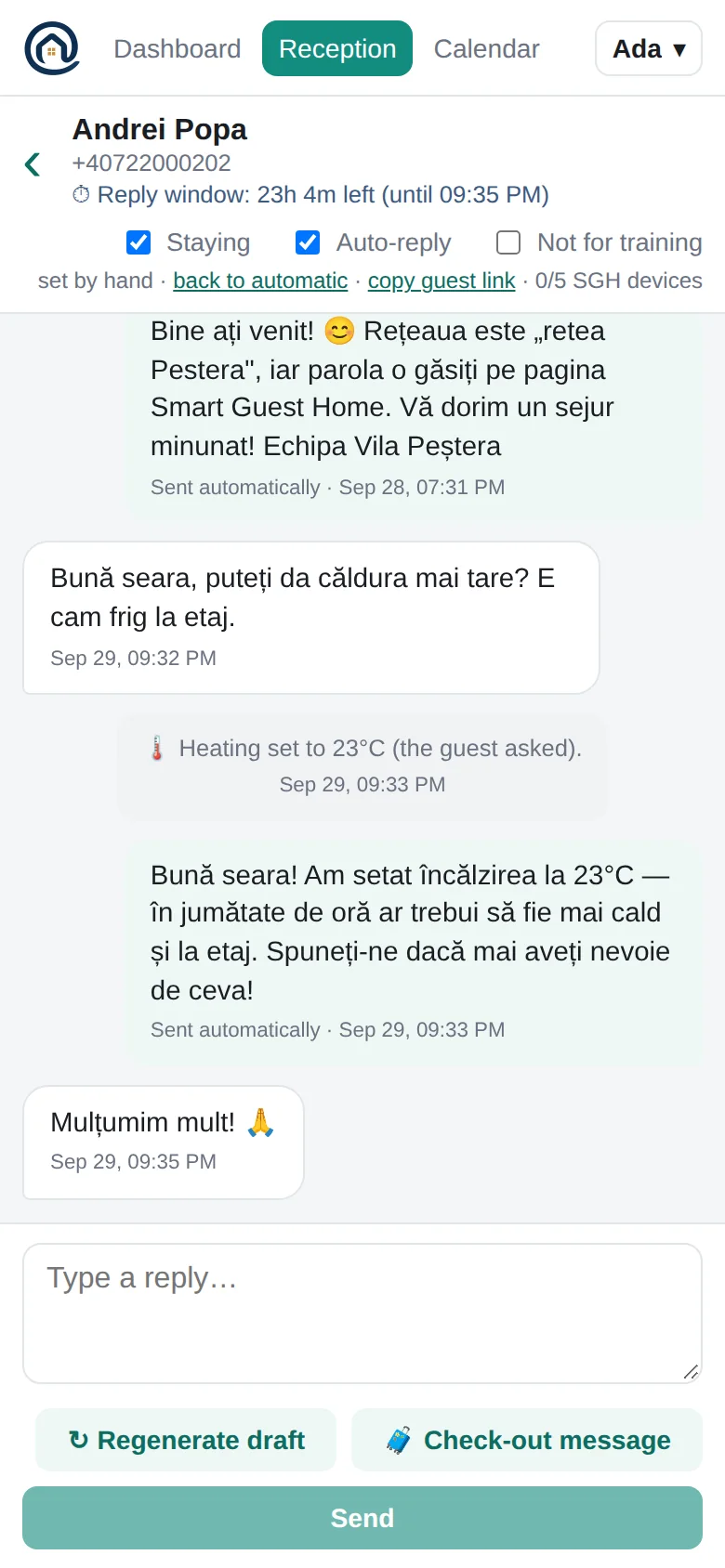
The inbox in the phone app A staying guest's conversation on the phone: the bot turned the heating up
Dashboard

The house at a glance

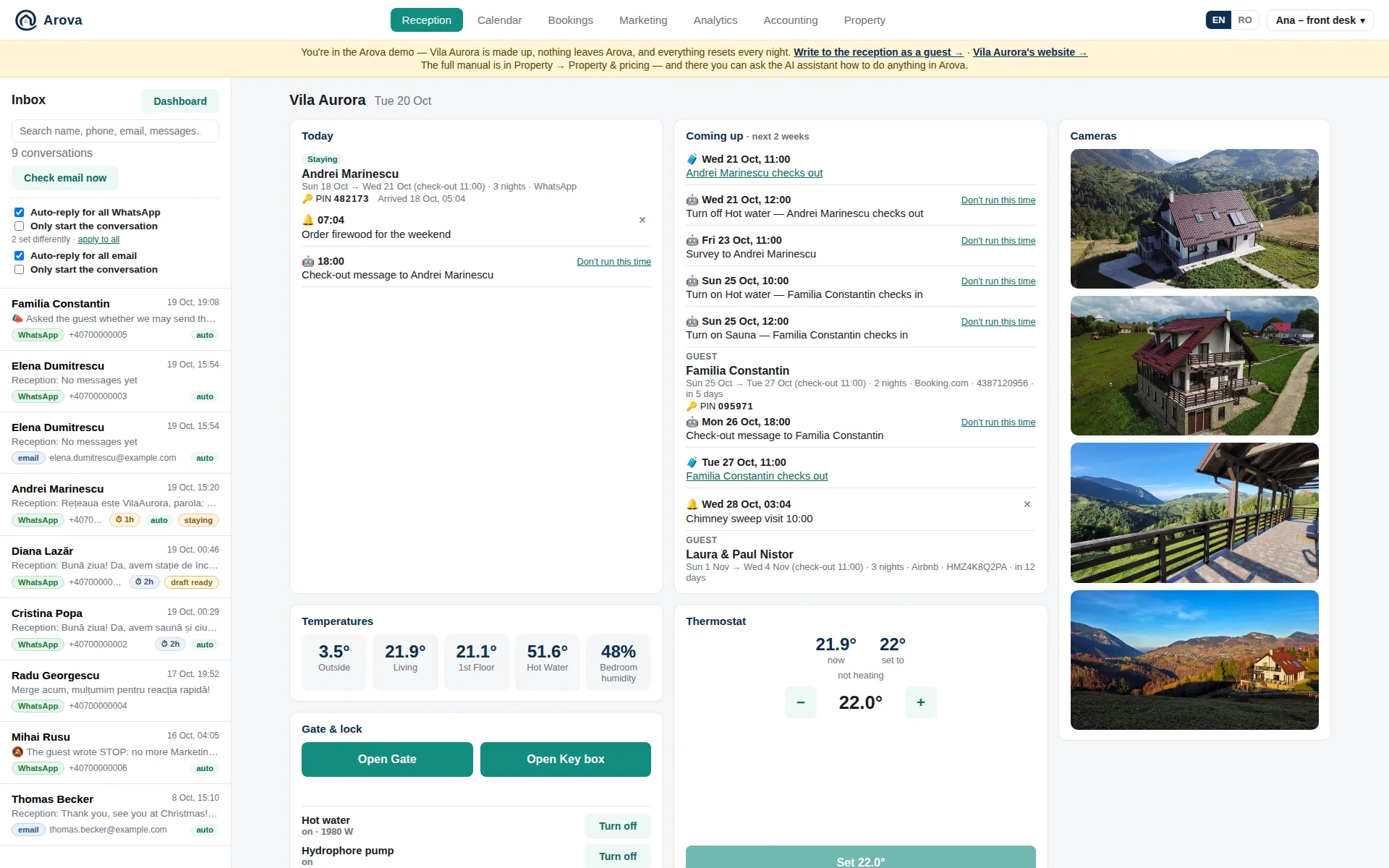
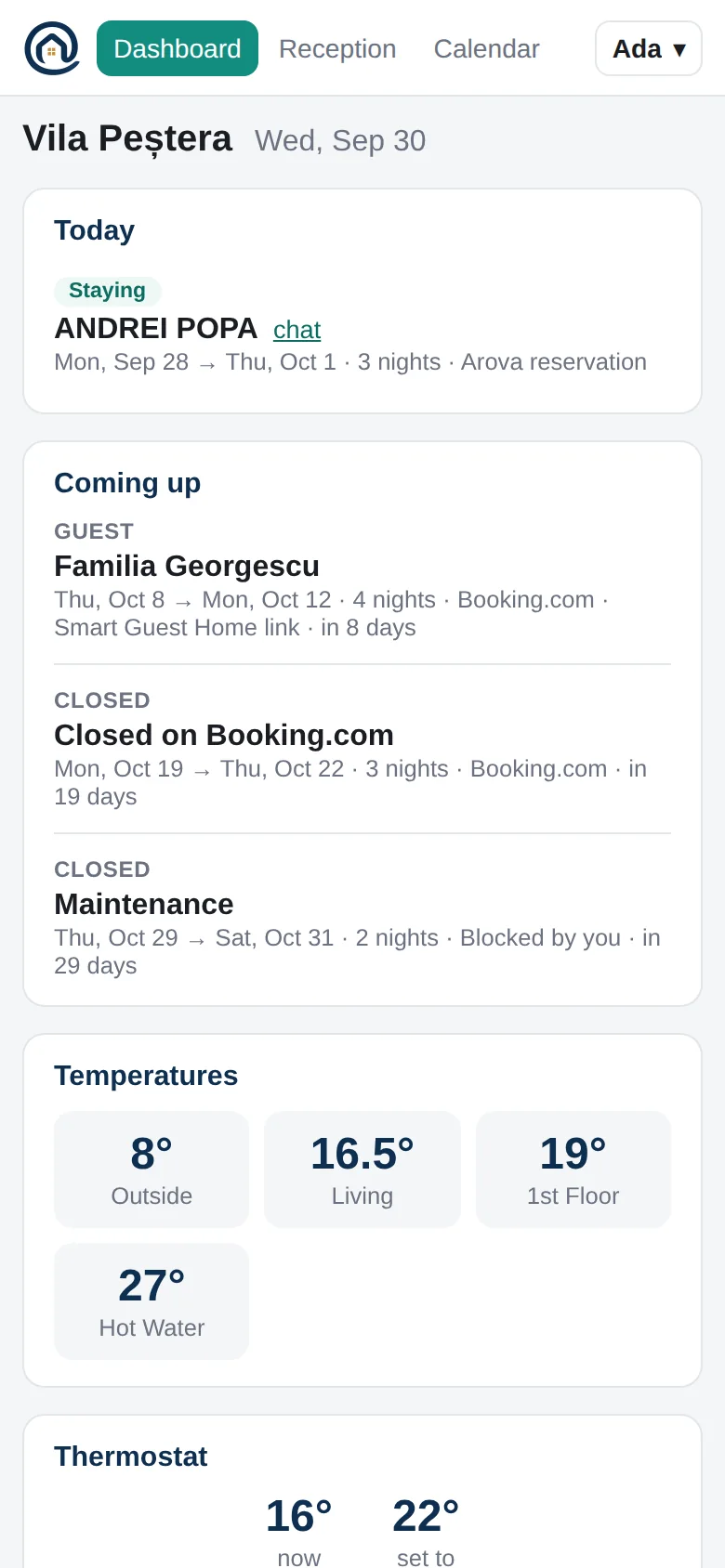
Who's here today and who's next, the temperatures in every room, the heating, the gate and the cameras — on one screen, on the computer and on the phone.

  • Arrivals, stays and departures straight from the calendar
  • Set the heating from anywhere
  • Open the gate for a late arrival
  • Live camera images, refreshed every 10 seconds
  • Each guest's key box PIN, and when they arrived and left
The Dashboard on a computer The Dashboard on a phone
Smart Guest Home

Your house, on the guest's phone

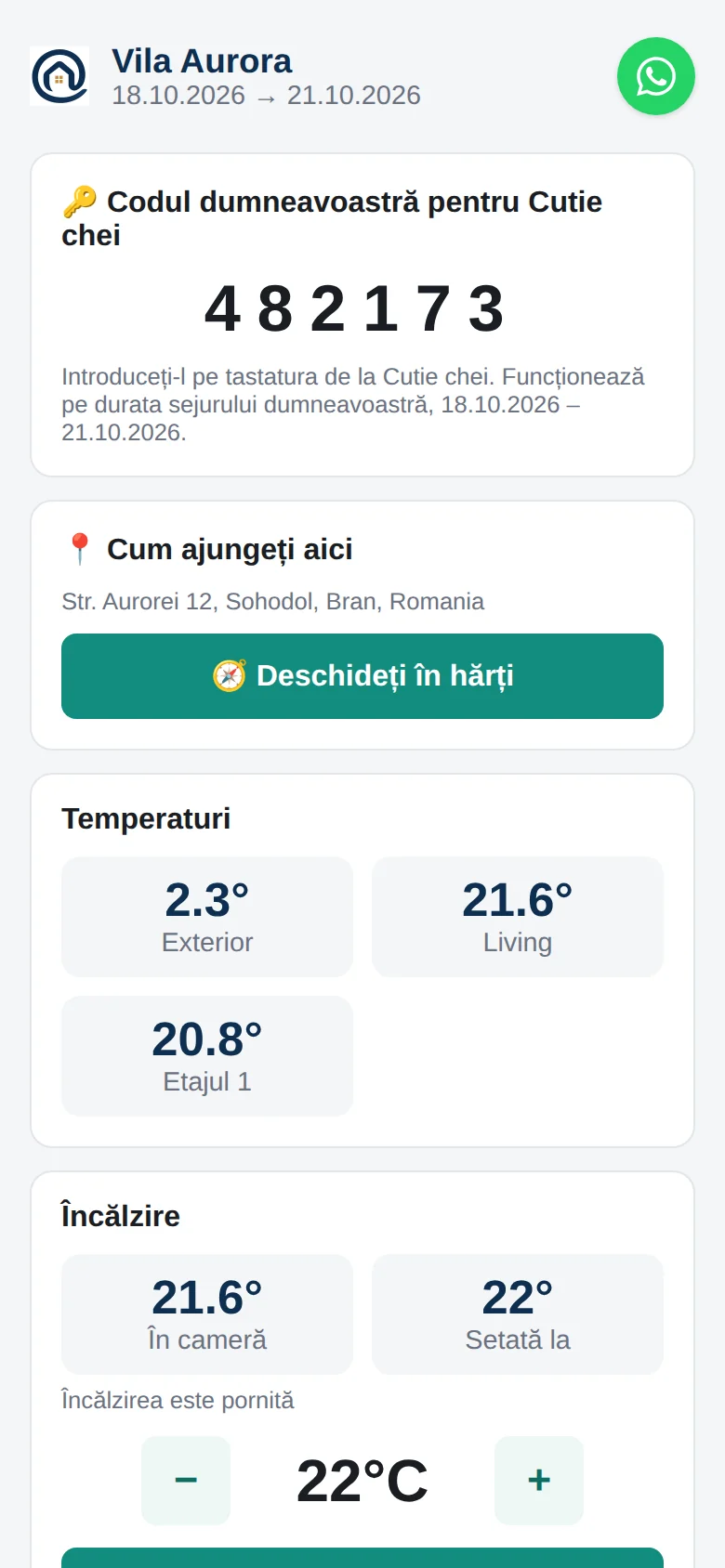
During their stay, each guest gets a private page — and the WhatsApp bot — with the Wi-Fi, the temperatures, the heating, the gate and the cameras. In their own language, automatically.

  • The Wi-Fi network and password, one tap to copy
  • The heating, gate and cameras from 10:00 on arrival day until 14:00 on departure day
  • Before they arrive: how to get here — Google Maps, Waze or Apple Maps — and your information for guests, in their language
  • On up to 8 devices per guest, with a WhatsApp button to reach you
  • The heating within the range you set — and a word that cold radiators are normal once the room is warm
  • Their own key box PIN, valid only during their stay
  • Links for Booking.com and Airbnb guests too, made for their dates in the calendar
  • "It's cold upstairs" on WhatsApp — and the heating goes up
A guest's Smart Guest Home page, in Romanian: Wi-Fi, temperatures and heating
Keys & arrivals

Every guest gets their own code — and you know when they're in

Each booking gets its own PIN on the key box, valid only from check-in to check-out and removed afterwards. The guest sees it on their Smart Guest Home page; you see it in Reception, to tell them by phone if need be. Their first opening is their arrival; the keys going back on check-out morning is their departure.

  • A new PIN for every booking — Booking.com, Airbnb or direct — set on the lock a week ahead
  • Moved with the dates, gone when the booking is cancelled or over
  • “The Popescus arrived, 16:42” — on your phone, and by email if you like
  • Guests leaving: the cleaning app is told the house will be free soon
  • Every opening with a guest's PIN in the activity log
  • Leaving? Before the key box opens, the guest is told which doors and windows are still open
  • Read from the lock's cloud — the lock's battery isn't touched
The house and its alerts

Every device in the house, watched for you

Reception's dashboard shows every sensor, the heating, the key box and its gateway, the smart plugs, the gate and every camera. In Notifications & Alerts, alerts written as sentences — “Notify when the water tank is below 30%”, “when the living room is above 27°C while a guest is staying” — checked every five minutes.

  • Temperatures, humidity, the water tank — from GDO Pi and Tuya sensors
  • Every camera on Reception's dashboard, next to the readings
  • A push and an email when something's wrong, and again when it's back to normal
  • “Isn't answering” waits for two checks, so a blip doesn't wake you
  • Only while a guest is staying — or only while the house is empty, as a frost guard
  • Message the guest by itself: “It's getting warm — lower the heating from your page”
  • Doors and windows: closed in green, open in red; a push when one opens while the house is empty
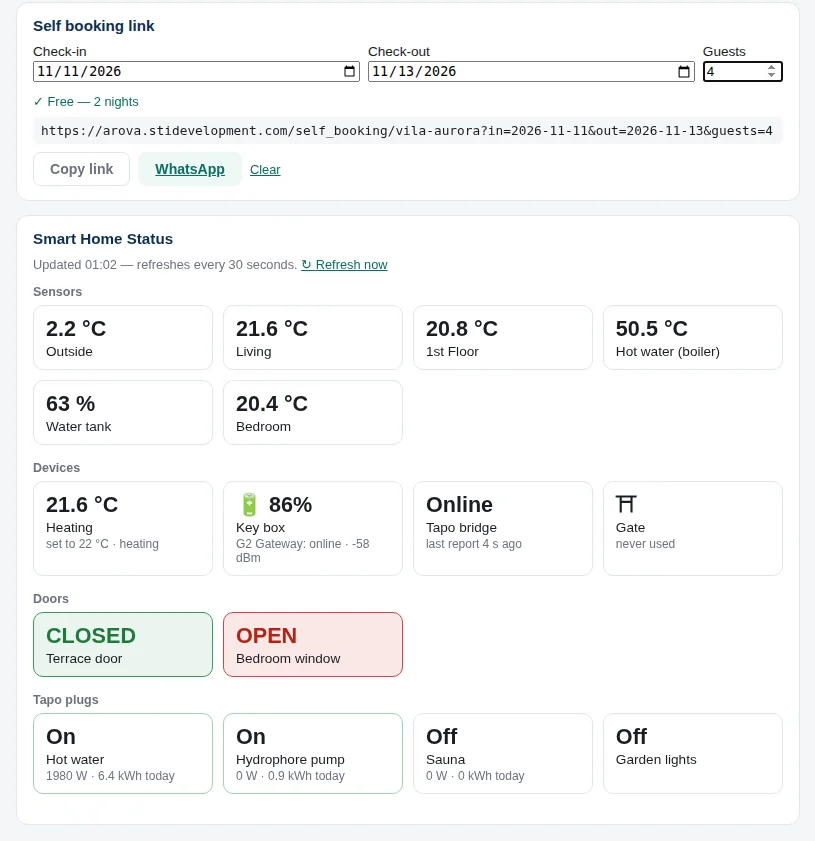
The Dashboard: the self booking link with dates checked, then the house's readings: sensors, devices, doors (closed green, open red) and Tapo plugs
The Dashboard: a self booking link for a caller's dates, then every reading in the house — sensors, devices, doors and windows, plugs.
For your guests

What your guests see

Two minutes at Vila Peștera from the guest's side: booking on WhatsApp, the gate opened from the chat, the TV's welcome and their Smart Guest Home page.

TV screen

The TV welcomes your guests

The TV in the house becomes its notice board: a slideshow with your welcome and the Wi-Fi, the temperatures, the cameras, the staying guest's Smart Guest Home code and how to cast from a phone. Arova builds an Android TV app for your property that opens the screen the moment the TV is switched on.

  • Choose the slides, their order and how long each one stays
  • Add your own images: house rules, a breakfast menu, the restaurant down the road
  • Every slide in Romanian and English
  • The guest's code only while they're staying — a new one for each stay
  • Keeps showing the last data if the internet drops
  • Guests can still cast YouTube or Netflix to it
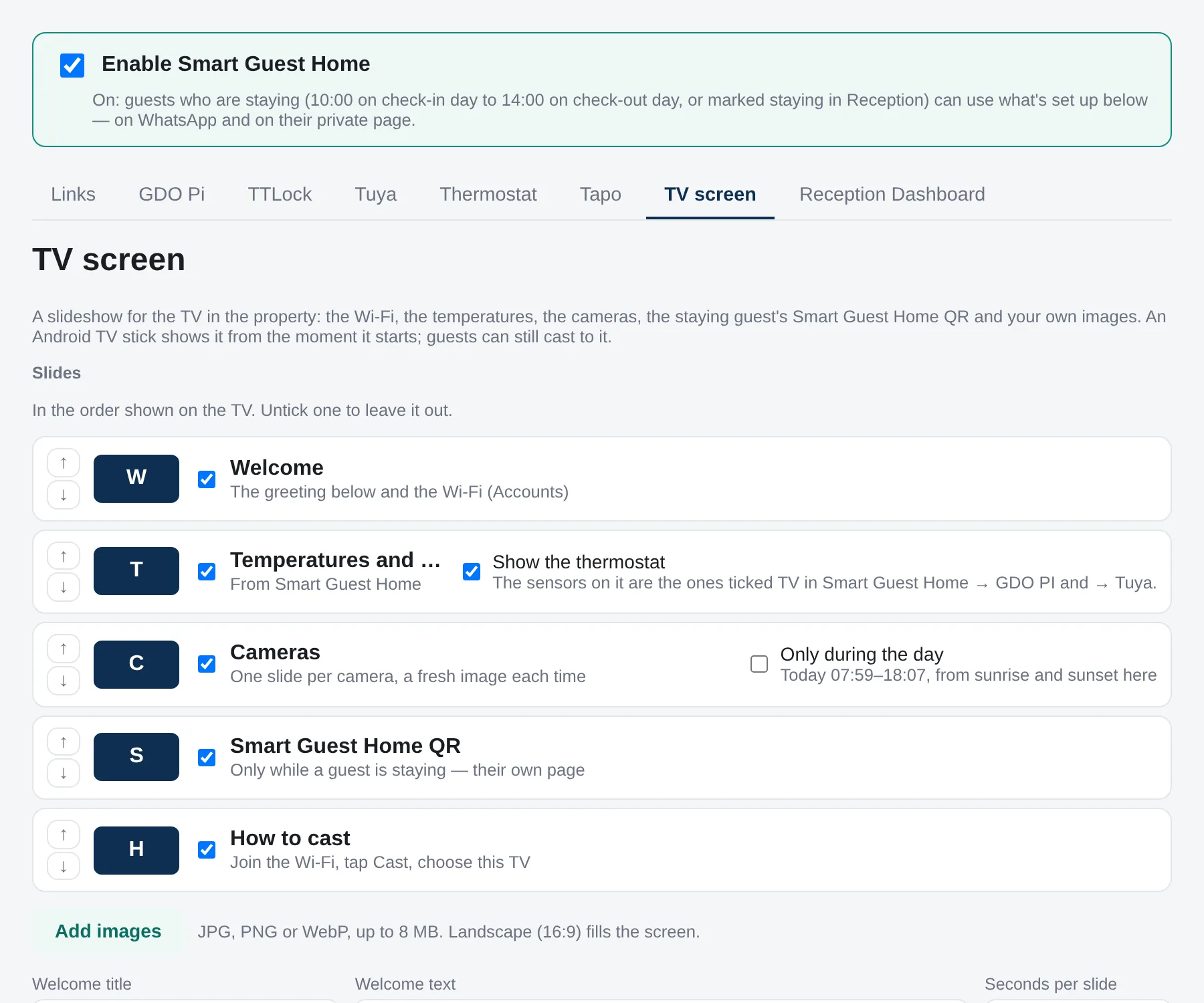
Property → Smart Guest Home → TV screen: the slides in order, each with arrows to move it and a box to switch it off, and the owner's own images
Property → Smart Guest Home → TV screen: move a slide up or down, untick it, add your own images.
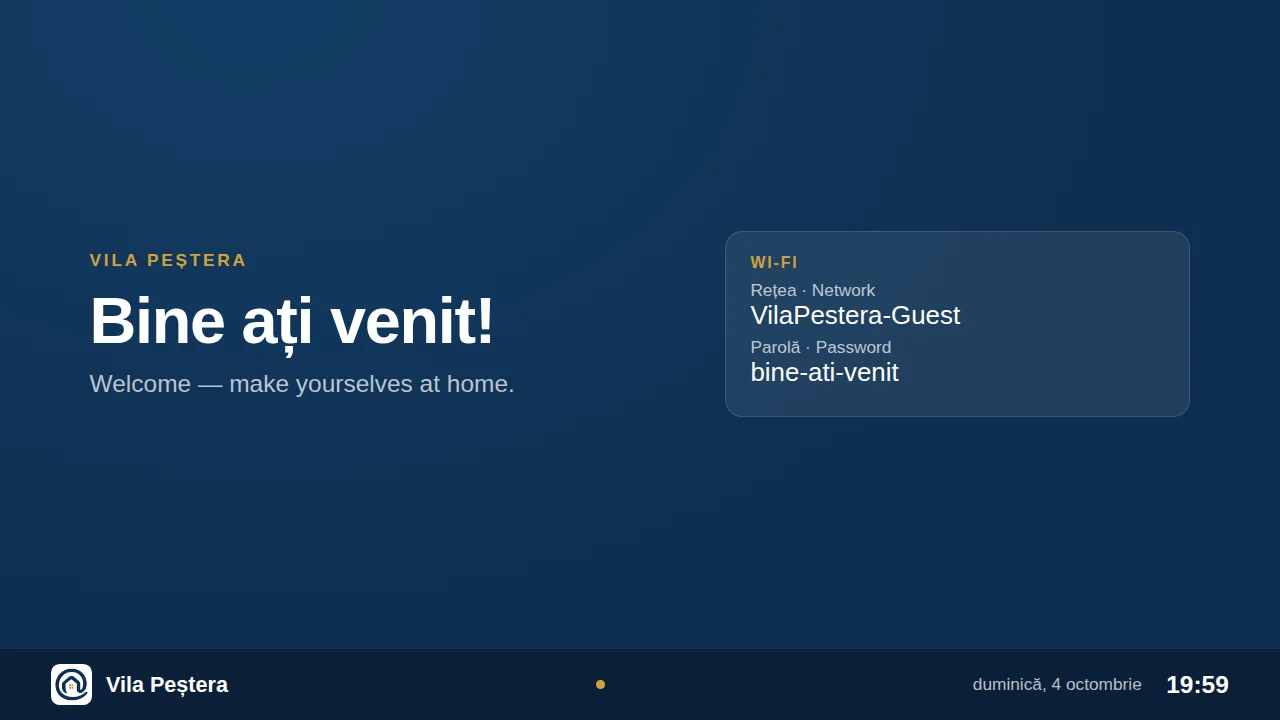
The TV's welcome slide, with the Wi-Fi network and password
Your welcome, with the Wi-Fi network and password.
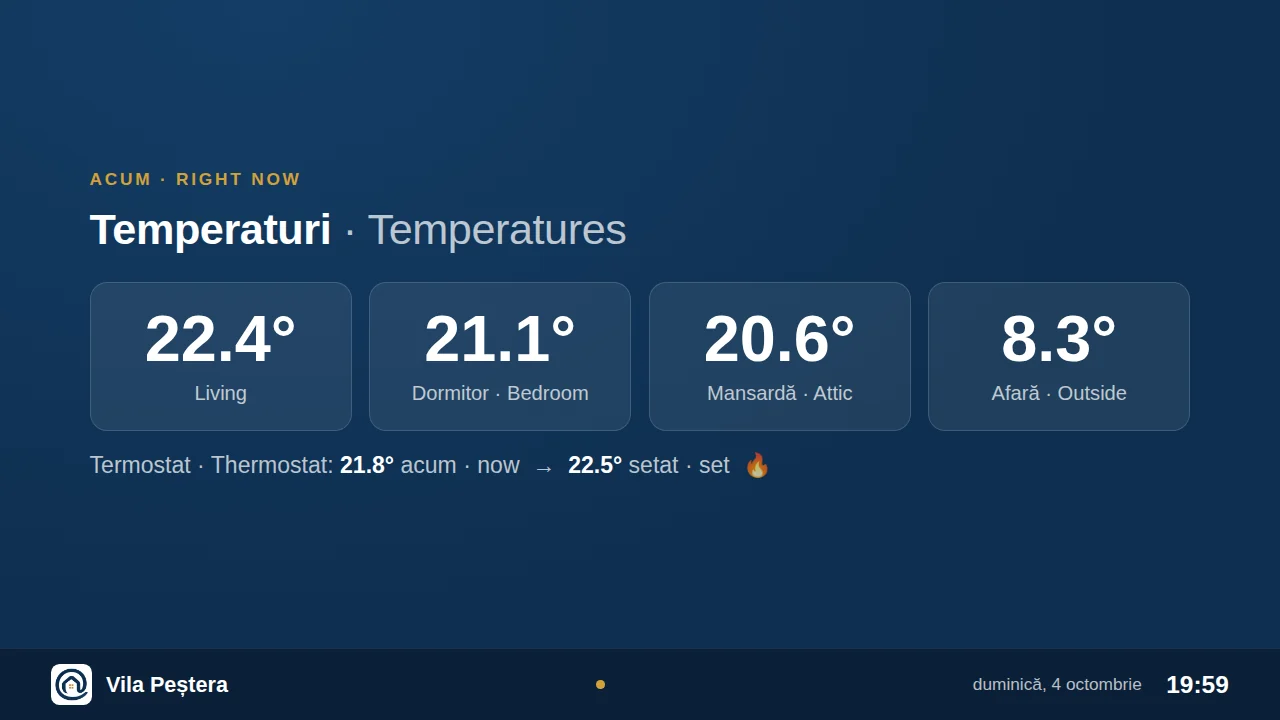
The temperatures in each room and the thermostat, on the TV
The temperature in each room, and the heating.
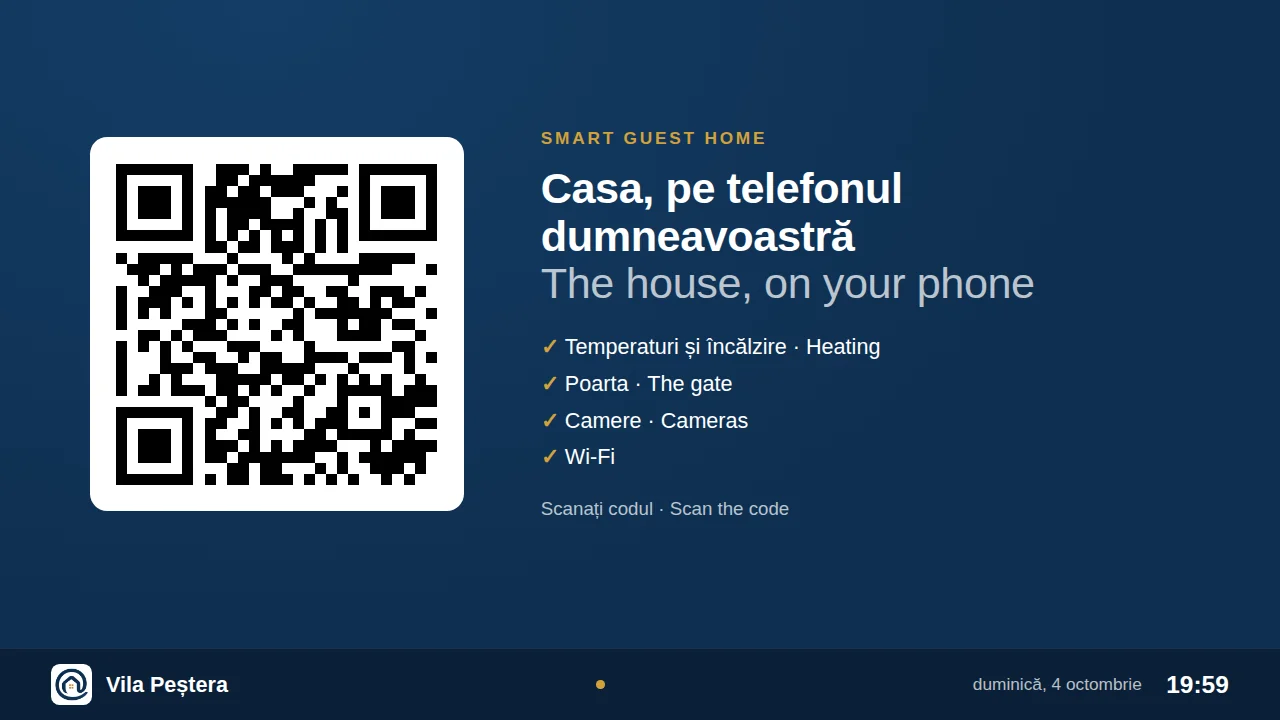
A QR code that opens the staying guest's Smart Guest Home page
The guest's Smart Guest Home, one scan away.
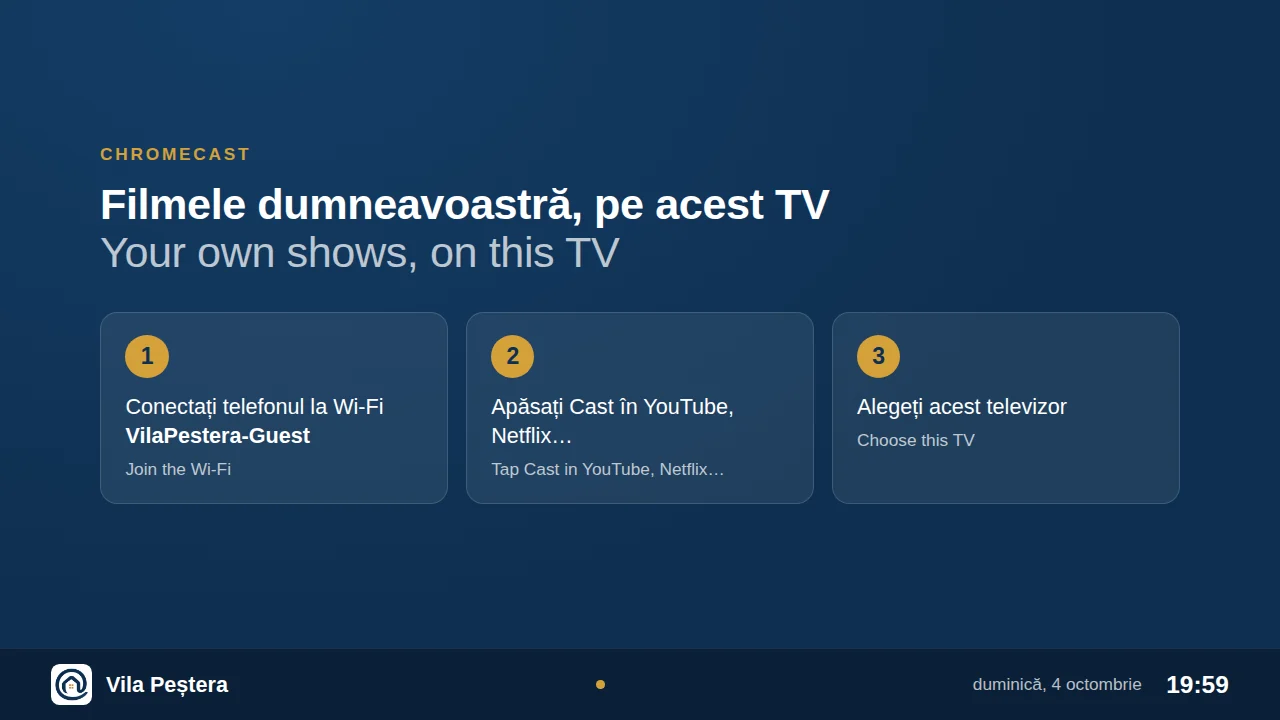
Three steps to cast from a phone to the TV
How to cast their own shows to the TV.
Automation

The house gets ready by itself

Hot water on before the guests arrive, the annex heating off once they've gone, the check-out message the evening before, the survey two days later. Set each rule once, as a sentence — Arova runs it around every stay and shows you how it went.

  • Tapo and Kasa plugs switched on check-in and check-out days, at the hour you choose
  • A plug that doesn't answer is retried for two hours — then the team is told
  • No “off” on a changeover day, so the next guest isn't left without hot water
  • Today's and upcoming automations in Reception, with ✓ or what went wrong
  • Every switch, gate opening and message in the activity log — per booking too
  • Plugs for guests, for Reception and for the cleaners' app, each chosen separately
  • A door left open with the heating on? Written in the log, and the guest gets a friendly message
  • The water tank going down too fast? In litres, in the log, to the guest and to your email — odd sensor readings ignored
  • After each stay, a stay report PDF: temperatures, activity, the cameras and the cleaning team's report
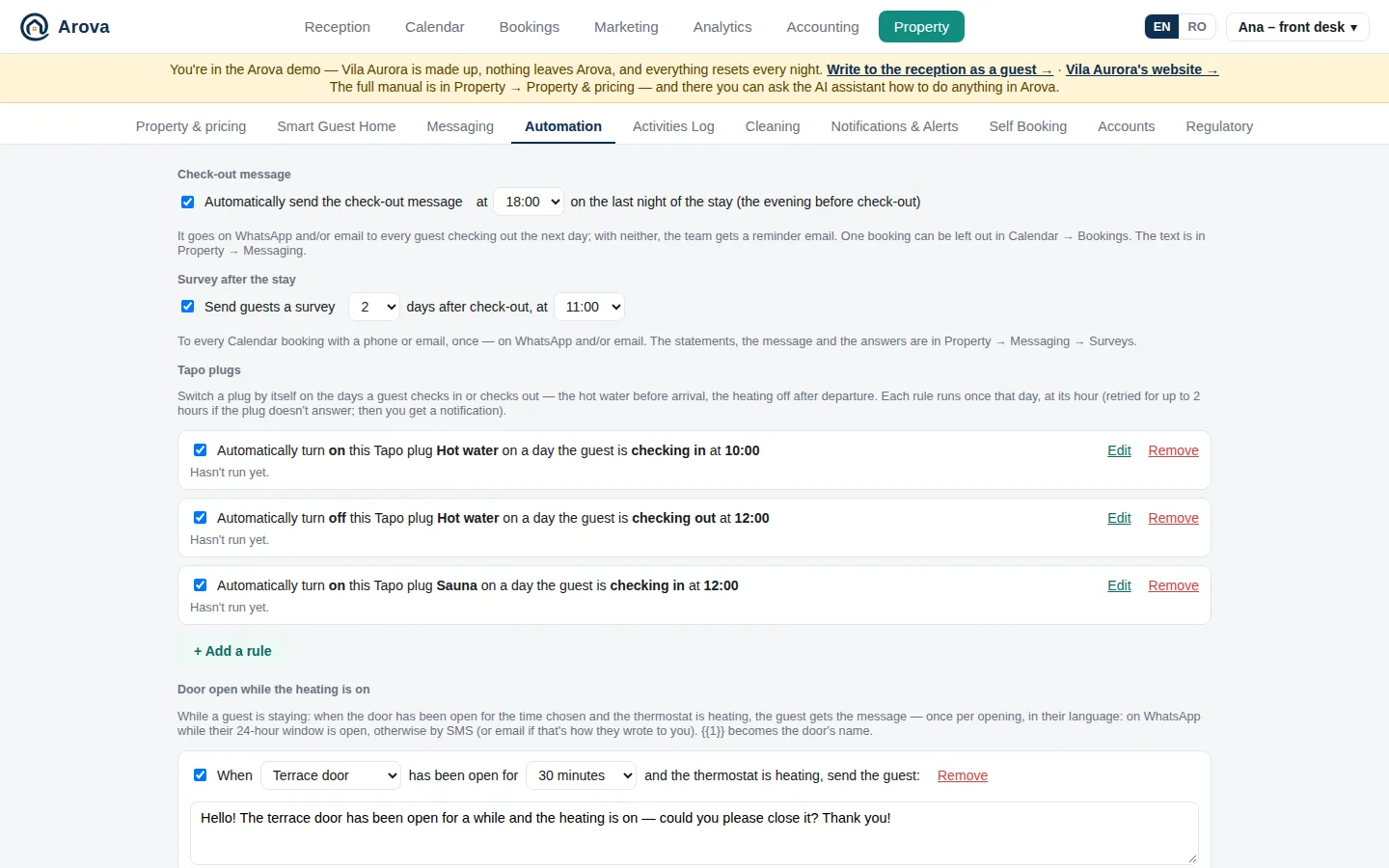
Property → Automation: the check-out message, the survey after the stay and plug rules written as sentences, each with its last run
Property → Automation: each rule reads as a sentence, with its last run.
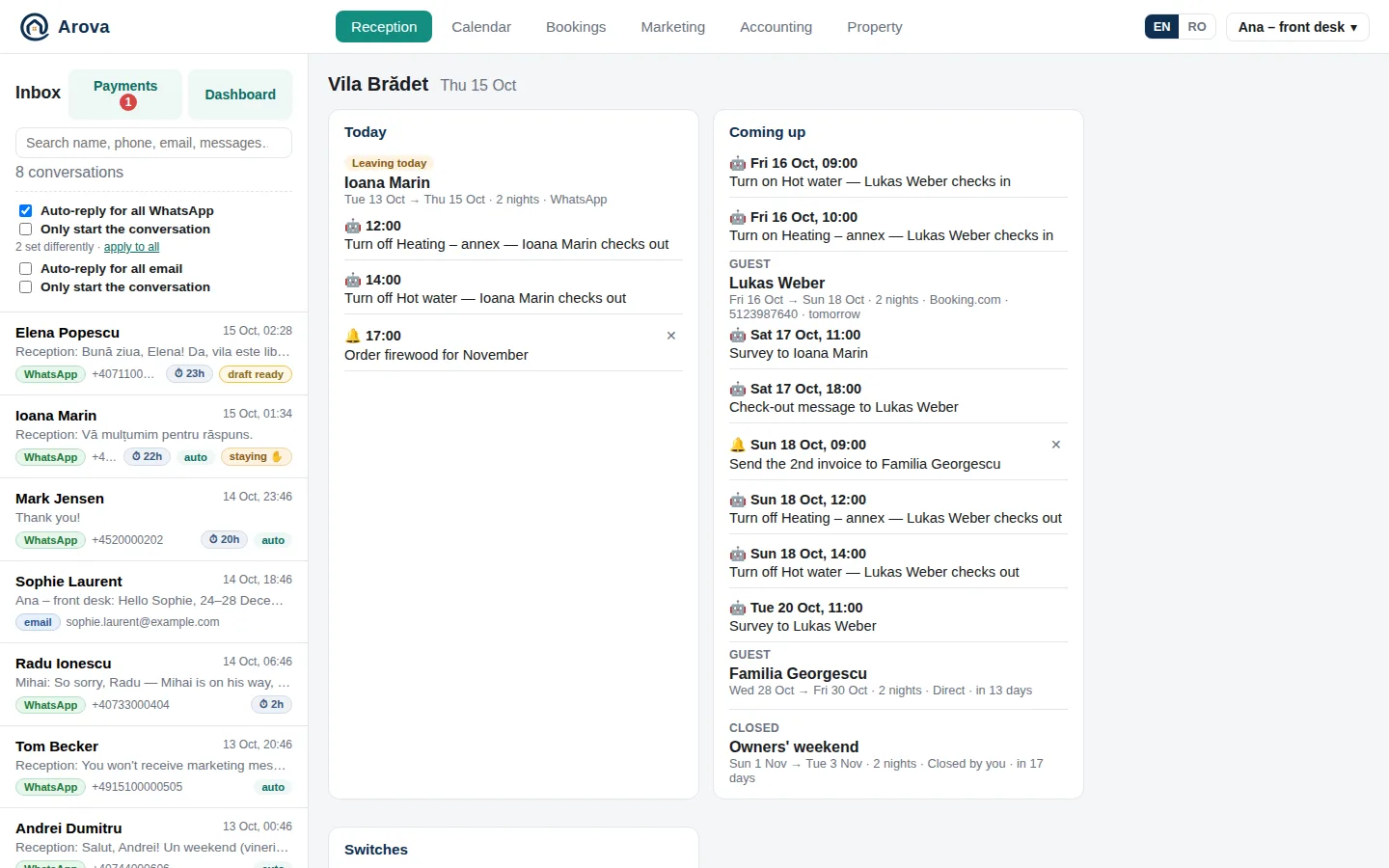
Reception's Today and Coming up, with the automations at their hour
Reception: today's and the coming days' automations (🤖) next to the stays.
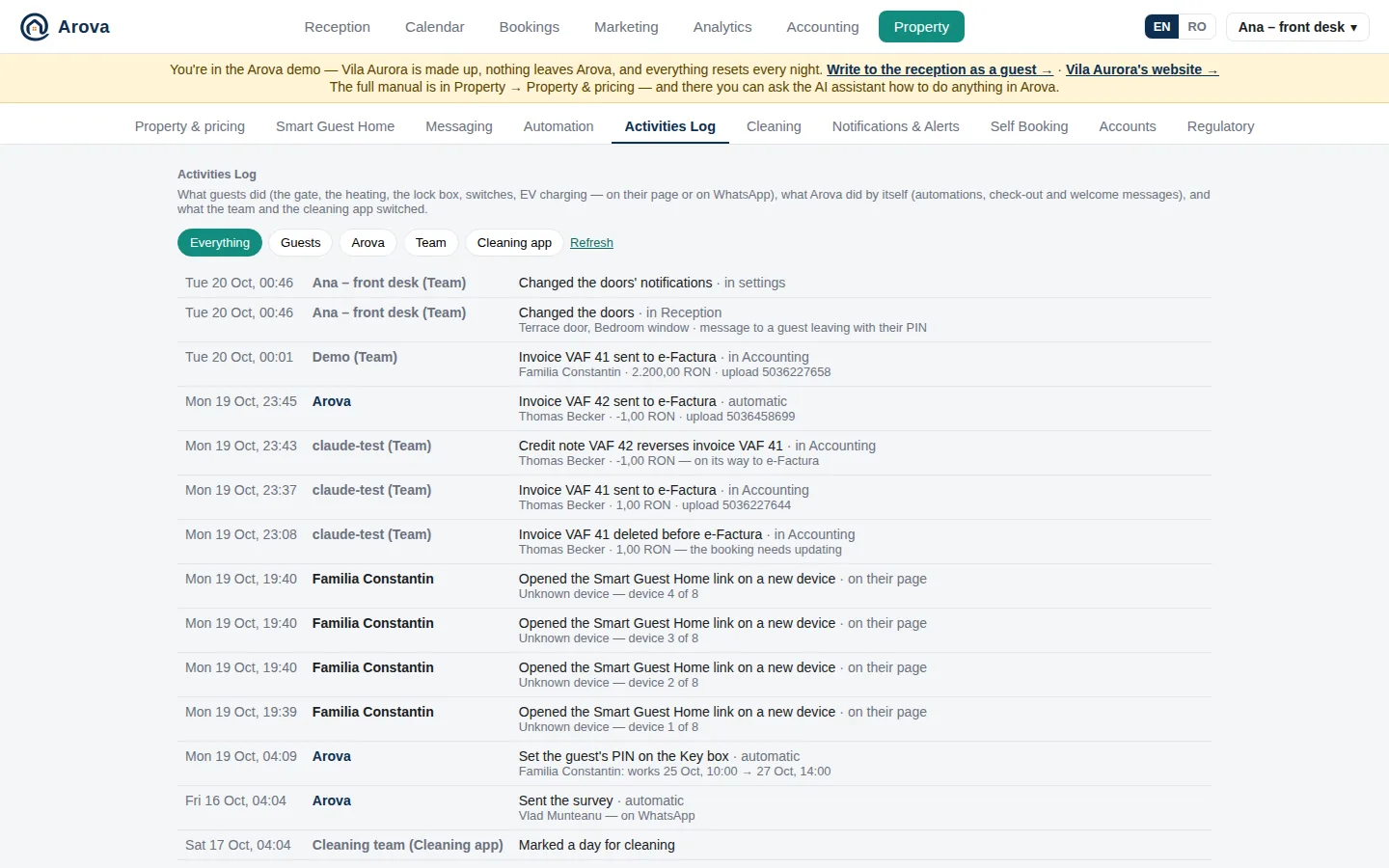
The activities log: what guests, Arova, the team and the cleaners did
The activities log: who opened the gate, turned up the heating or switched a plug — and what Arova did by itself.
Surveys

Know how the stay really went

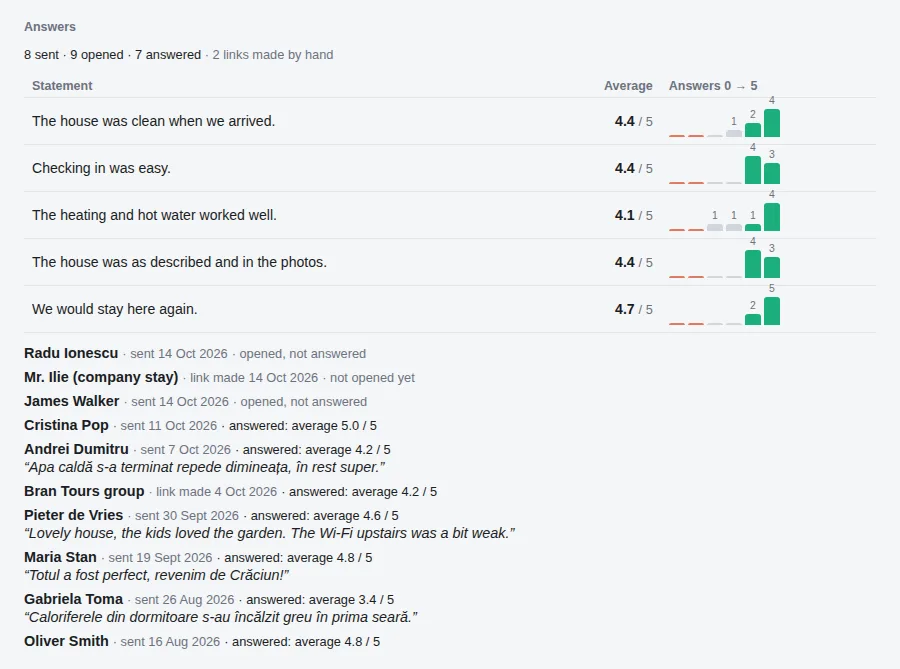
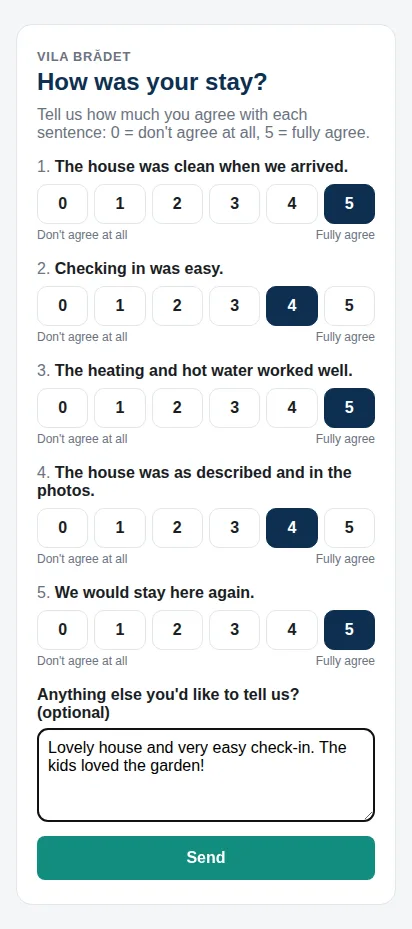
A few days after check-out, every guest gets a short survey on WhatsApp or by email: your own statements — “The house was clean when we arrived”, “We would stay here again” — scored from 0 to 5, and a comment if they like. On their own page, in their language.

  • The averages per statement, the spread of scores and every comment, in one place
  • Sent by itself, the days after check-out and at the hour you choose
  • Survey links made by hand, for guests who booked elsewhere
  • Hear about a cold bedroom before it becomes a review
  • Guests who loved it are asked for a review — on Google, or on Booking.com for its guests — with an SMS reminder
Survey answers: the average of each statement, the spread of scores from 0 to 5, and guests' comments The survey on a guest's phone
Reception Training

It answers the way you do

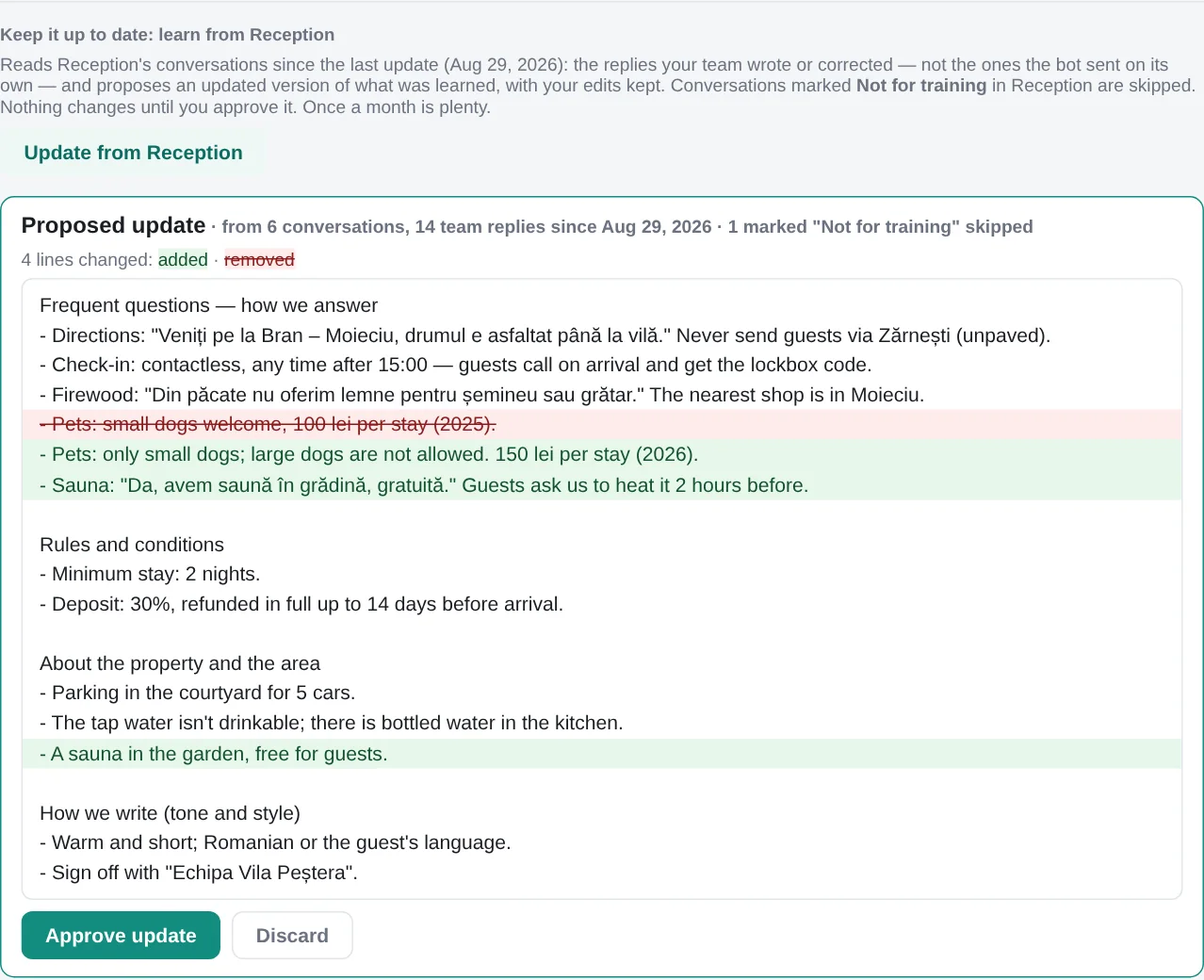
Arova learns from years of your WhatsApp Business conversations — read once from the phone's own encrypted backup — and keeps learning from what your team writes in Reception. Every update is shown line by line, and nothing changes until you approve it.

  • Your usual answers, rules, exceptions and tone
  • The same backup brings your old chats into Reception — so past guests become leads
  • Guests' phone numbers, emails and ID numbers removed before the AI reads anything
  • Mark any conversation "Not for training"
Property → Messaging → Reception Training: a proposed update to what was learned, with added and removed lines
An update from Reception: the team's correction about dogs, and the new sauna.

And the rest of the front office

Customers

A profile for everyone who has written: their stays, proformas and ID details — WhatsApp and email merged into one person.

Set up by chatting

Describe the property to the assistant, or import your website — the profile fills itself in.

Prices and rules

Nightly rates by season and weekday, minimum stays, check-in and check-out times the AI quotes correctly.

Extend my stay

The nights free after a stay offered to the guest at a discount — two taps on their page, paid, and their booking simply gets longer.

Waiting list

Dates taken? Guests wait for them, and are told the moment they free up — with your own message and a voucher if you like.

Pay 50/50

Guests booking ahead pay half now; the second half’s proforma goes out by itself a week before check-in.

Your own mailbox

Guests' emails arrive from the property's address, and replies go out from it, in the same thread.

Website forms

Booking and contact forms on your site post straight into Reception, in the visitor's language.

Message templates

Welcome and check-out messages with each guest's Smart Guest Home link filled in.

Fresh start

Make the bot forget a conversation so far, when a guest starts over with a new question.

Watched around the clock

Health checks and alerts: if WhatsApp, the server or the disk misbehave, we know first.

Several properties

Each property has its own login, number, mailbox, calendar and settings.

Everything Arova does — 200 features

The whole list, in one place.

Reception: guest messages

  1. WhatsApp inbox with AI-drafted replies
  2. Auto-reply, set separately for WhatsApp and email
  3. “Answer once”: the bot answers the guest's next message, then hands back to you
  4. “Only start the conversation”: the bot answers the first few messages, optionally again after a few hours
  5. The bot learns from how you edit its drafts
  6. Replies in the guest's language, with the right grammatical gender from their name
  7. Translation: messages in a language you don't speak shown translated under them; you write in your language (English, Romanian, German…) and the reply goes out in the guest's — Romanian never translated unless you choose, long emails left out
  8. A reply that slips a word of another language corrected before it goes
  9. Availability, holidays and minimum stays checked against your calendar before the bot answers
  10. “When are you free?” answered with the next free weekday and weekend stay, and the booking link
  11. Complaints, emergencies, refunds and discount requests pause auto-reply and alert the team
  12. Email inbox from the property's own mailbox, in the same threads
  13. Your website's booking and contact forms arrive in Reception
  14. WhatsApp's 24-hour reply window shown, with approved templates once it's closed
  15. Photos and documents guests send, right in the conversation
  16. No message lost when WhatsApp is briefly down
  17. “Staying” status: automatic from the booking (Booking.com and Airbnb guests included), or set by hand
  18. Booking.com guests writing through Booking.com's relay address matched to their reservation
  19. “Fresh start”: the bot forgets a conversation so far
  20. “Block & delete” for spam, with a list of blocked senders
  21. “Delete” for an email that landed in Reception by mistake, without blocking the sender
  22. Search conversations by name, phone, email, ID name or message text
  23. Links in messages clickable
  24. Where each new conversation came from: Google, Facebook, Instagram, your website, the booking page or a partner
  25. “Not for training” per conversation
  26. 📎 Send a file in a conversation: on WhatsApp while the 24-hour window is open, by email any time
  27. A WhatsApp message that wasn't delivered shown in red, with why
  28. Your own standard answer to “more information, please” — sent word for word, translated for other languages

Guest IDs, proformas and invoices

  1. ID card or passport read from a photo or PDF, asking for anything missing
  2. Proforma (PDF) issued and dates blocked as soon as a stay is agreed
  3. Proformas issued or deleted by hand, with your own series
  4. Invoices in SmartBill or in Arova, in instalments too
  5. Company bookings checked at ANAF and VIES
  6. Romania's arrival form (fișa de anunțare a sosirii): filled from the ID, signed on the guest's phone, kept as a PDF for 5 years
  7. Identity details asked on the booking page and in the booking too — always optional
  8. Proformas in instalments — as many as you like, each with its own amount and day, issued and sent by itself
  9. An invoice draft in SmartBill made by itself for each payment (for an instalment, once its proforma is paid)
  10. Or Arova's own invoicing: each payment's invoice issued and sent to the guest at once, then to e-Factura by itself 48 hours later

Calendar and bookings

  1. Two-way sync with Booking.com and Airbnb
  2. Airbnb reservations become bookings by themselves — moved and cancelled ones follow
  3. Every closed range explained: which booking, from which channel
  4. Right-click a day: open, cleaning or closed — open a day closed on Booking.com or Airbnb to sell it directly
  5. Prices per night, minimum stays per day, legal holidays and a booking window
  6. Change prices in plain words
  7. Check-out badges, cleaning and closed days in colour
  8. Reminders emailed to the team on a set day and time
  9. Rent the whole property or room by room, each room with its own calendar and cleaning
  10. Cleaning nights closed before and after every booking, by themselves
  11. A minimum stay over chains of legal holidays (a holiday Friday + the weekend…), across the whole booking window
  12. Cancel a booking: its nights open, its proformas and instalments void, all listed before you confirm
  13. A check-out hour per booking
  14. Travelminit too, through its calendar link — each platform switched on or off on its own
  15. A waiting list for taken dates — from the booking page or WhatsApp, New Year’s Eve and Christmas too — the guests told the moment the dates free up, with a voucher if you like

Self-booking and payments

  1. Your own booking page: photos, map, terms in the guest's language, dates held while they pay
  2. Price boxes for your own website
  3. Card payments through Stripe straight into your account, with payment links
  4. Bank transfers read from the bank's emails and matched to their proforma
  5. Mark a booking paid by hand
  6. See how many opened your booking link without booking
  7. Affiliates: partner links, their visits, and commissions on paid bookings
  8. Bill each property in RON or EUR: proformas, invoices, card payments
  9. One Stripe account for all your properties
  10. A self booking link for any dates, made in Reception — Copy, Share or WhatsApp
  11. Booking.com and Airbnb payouts matched to the stay they pay, filling in a missing amount
  12. Card payments listed with the bank transfers in Reception
  13. Discount vouchers: a code with a percentage off and valid dates, typed on the booking page or in the link
  14. Holiday cards (tichete de vacanță) through NETOPIA — alone or with a bank card for the rest, each part invoiced
  15. Pay 50/50: half now, the second half’s proforma sent by itself 7 days before check-in — the team told if it’s still unpaid

Messages that send themselves

  1. Welcome message once a booking is paid in full
  2. A reminder to welcome Booking.com guests, with a link to the reservation
  3. Check-out message the evening before, at the hour you choose
  4. The arrival form reminder as an approved WhatsApp template once the 24-hour window is closed
  5. The Extend my stay offer on the guest’s first or second night — WhatsApp, SMS or email

Smart Guest Home

  1. The guest's own page, in their language, during their stay, on up to 8 devices
  2. Temperatures from the house's sensors
  3. Open the gate
  4. Live camera pictures
  5. Set the heating (Salus thermostat)
  6. Open the lock box (TTLock), with the number to call if it doesn't
  7. Wi-Fi name and password
  8. Guest links for set dates (e.g. Booking.com and Airbnb guests), or 5-day links
  9. All of it over WhatsApp too: “open the gate”, “set the heating to 22”
  10. EV charging, billed per kWh with its own proforma
  11. Tapo and Kasa smart plugs — the hot water, the pump, the sauna
  12. Plugs switchable by guests, in Reception and in the cleaning app
  13. One switch to turn it all off for guests
  14. A personal key box PIN for every booking, valid only during the stay
  15. Arrival known from the guest's first key box opening — the team told
  16. Departure known when the keys go back in the box on check-out morning — the cleaners told
  17. Choose which sensors guests, Reception, the cleaning app and the TV each see
  18. How to get here — Google Maps, Waze, Apple Maps — and your information for guests, from the day the link works
  19. A WhatsApp button to reach you, next to the property's name
  20. The heating range guests can set, chosen by you
  21. Door and window sensors: on check-out day the guest is told which are still open before the key box opens
  22. Your social media at the foot of the guest's page — YouTube in their language
  23. An RO / EN switch on the guest's page, and a default language for guests whose language isn't known
  24. Door and window sensors reported the moment they change (Tuya's push), and over the property's Wi-Fi through a small local box when the cloud is down
  25. Extend my stay: the free nights after the stay offered at a discount — the guest picks +1, +2… nights and pays, and the same booking is extended
  26. Extended? The cleaning, the key box PIN and the check-out message move with it, and the cleaners are told

TV screen

  1. A slideshow on the property's TV: welcome, Wi-Fi, temperatures, cameras, how to cast, your own images
  2. Arova TV app for Android TV sticks, paired by code and named by room
  3. The welcome slide greets the staying guest by name
  4. Camera slides only in daylight, from sunrise and sunset at the property

Automation

  1. Turn plugs on or off on check-in and check-out days, at the hour you choose
  2. A plug that doesn't answer is retried for two hours, then the team is told
  3. No “off” on a changeover day, so the next guest isn't left without hot water
  4. The survey a set number of days after check-out, at the hour you choose
  5. Today's and upcoming automations in Reception — plugs, check-out messages, surveys — with how they went
  6. A door left open while the heating is on the whole time: written in the log and / or the guest messaged
  7. Skip a plug automation just for today, from Reception
  8. A water tank going down more than you set in a few hours: written in the log, the guest messaged and / or the team emailed — in litres, from the tank's size
  9. Odd sensor readings (80% → 10% in half an hour) taken for read errors, never acted on
  10. Automation's messages to the guest: WhatsApp while the window is open, else SMS from the property's name with the WhatsApp number to answer on — and by email too

The house at a glance, and alerts

  1. Every device at a glance: sensors, heating, key box and gateway, Tapo bridge and plugs, the gate
  2. Every camera on Reception's dashboard
  3. Alerts on any reading — below, above, not answering — with a push, an email and “back to normal”
  4. Alerts only while a guest is staying, or only while nobody is
  5. Message the staying guest when an alert starts — WhatsApp or SMS, in their language
  6. Tuya sensors too: temperature, humidity, a water tank's level
  7. An alert waits for a second check, so one odd reading doesn't set it off
  8. Doors and windows: closed in green, open in red
  9. A push or a cleaning app notice when a door opens while the house is empty, or the first time a guest opens it
  10. Alerts can notify the cleaning app too

Surveys after the stay

  1. A short survey a few days after check-out, on WhatsApp or by email
  2. Your own statements, each scored 0 to 5, then a comment
  3. On the guest's own page, in their language, answered once
  4. Survey links made by hand, for guests without a booking
  5. Each statement's average and spread, and every comment
  6. Guests who scored it 4 or 5 asked for a review — Google, or Booking.com for its guests — with an SMS reminder
  7. Happy guests also asked to follow you on social media — only the networks you have

Activity log

  1. Each booking's guest activity: gate, heating, lock box, switches, EV charging, new devices
  2. One log of everything guests, Arova, the team and the cleaners did
  3. Filter by guests, Arova, the team or the cleaners; anything that failed shows why
  4. Every key box opening with a guest's PIN
  5. Every door and window opening and closing
  6. A day picker, door openings folded into one line, and doors / windows and automatic temperatures shown or hidden
  7. Marketing sends logged: who, how many by SMS, WhatsApp and email, and the SMS used

Stay reports

  1. A stay report PDF per booking: average temperatures by day and night, sunrise and sunset, the guest's activity, a picture from each camera and the cleaning report
  2. Made again whenever you like, and a final one when the guest's access ends — kept, and emailed if you like
  3. In English and in the property's own language
  4. Odd sensor readings left out of the averages

Today at a glance

  1. Today and coming up: stays, reminders and automations in time order
  2. Temperatures, thermostat, gate and lock, live EV charging
  3. Cameras
  4. The guest's key box PIN, and when they arrived and left
  5. A 🧳 check-out line for each guest leaving, at their booking's hour
  6. Self booking link and the house's devices — sensors, doors, plugs — right under the gate and lock
  7. In tabs: Today, Heating & Access, Smart Home Status, Quick Links — with each staying and coming guest's link to copy
  8. Today's activity under today's items, with a small icon per line
  9. Reception Notes: one shared note for the whole team, with who saved it last

Marketing

  1. Prices of similar places nearby, from Google Hotels
  2. Your competitive set, followed over time
  3. AI recommendations on prices and offers
  4. What the competition posts on social media, and post ideas for you
  5. Follow up with people who asked and didn't book — by WhatsApp, SMS or email
  6. Find leads by asking in your own words
  7. Reviews of your listings and of the places next door
  8. The market read, recommendations and reviews in the app's language
  9. Send an SMS to everyone who agreed — now or at a set day and hour — with the SMS it takes and what's left
  10. Marketing on WhatsApp, free, to guests who wrote in the last 24 hours; SMS for the rest
  11. Post to Facebook, Instagram and TikTok from Arova: ideas from your free dates, the trends and what guests praise, with your photos, videos or Google Photos
  12. Facebook video posts with the real “Send WhatsApp message” button

Marketing consent and privacy

  1. Guests asked once whether they want deals and news
  2. STOP and unsubscribe respected on WhatsApp and email
  3. “No marketing” per contact
  4. Processing terms, sub-processors and records ready for GDPR
  5. ID photos deleted 90 days after the stay

Customers

  1. A profile for everyone who has written, with their bookings
  2. The same person on WhatsApp and email merged into one
  3. Their conversations under their profile

Analytics

  1. Nights booked, unsold and closed; inquiries; confirmed and projected income
  2. Expenses and money in from your bank statements (expcateg.com)
  3. Charts and an AI chat about your figures
  4. How many opened the self booking link, and how many booked

Accounting

  1. Utility bills emailed in — PDFs or download links — read by AI: date, supplier, amount
  2. A monthly ZIP for your accountant, with a summary and the total
  3. Bills: the company's own invoices that e-Factura doesn't have — AWS, Heroku and other foreign suppliers — told apart from the utility bills by the company's name on them, no payment needed
  4. Bills e-Factura: the suppliers' invoices received in e-Factura, by month, each with its PDF and XML
  5. Every proforma, payment and invoice in one place — click one for its booking, conversation and documents
  6. e-Factura connected: the invoices sent and received read every hour, kept with their XML and PDF
  7. Invoices go to e-Factura by themselves after 48 hours — the guest changed their mind? Delete it, no storno needed
  8. A credit note (storno) in one click, sent to e-Factura at once
  9. An email 30, 10 and 3 days before the e-Factura login has to be renewed
  10. Stats per year and per channel: Booking.com, Airbnb and direct
  11. Delete… a proforma made by mistake: its pay link stops, its number kept

Setting up

  1. Set up the property by chatting with the assistant, or import your website
  2. Your terms and conditions, which the bot answers from
  3. Emails to the team: unanswered messages, new bookings, new payments, guests arriving and leaving
  4. Train the bot on your past WhatsApp chats
  5. A manual for every page — and the setup assistant answers “how do I…?” from it
  6. Several properties under one login, switched from the menu — sharing one WhatsApp number if you like, each with its own calendar
  7. Your social media pages: Facebook, Instagram, TikTok, and YouTube in Romanian and English
  8. The property's time zone from its Google Maps link — every time and automation at the property's own hour
  9. SMS through your own SMSLink account, with the SMS left shown

Apps for the team

  1. Installable app with notifications and a name per device
  2. A cleaning app for your cleaners, in Romanian or English — with the gate, key box, plugs, readings, doors and windows, and cameras you choose
  3. Always the latest version, without reinstalling
  4. English and Romanian
  5. Phones, tablets and foldables
  6. 🧹 Cleaning report from the cleaning app: how the house was left (1–5 stars), a note and pictures from the phone's camera, matched to its booking and emailed if you like

Arova and the alternatives

Four or five tools — or one

We reviewed 15+ products in October 2026: global vacation-rental platforms, Romanian hotel software and specialist AI, pricing and check-in tools. None of them covers what Arova does on its own.

IncludedSome products, higher plans or paid add-onsNo
ArovaGlobal rental platformsRomanian hotel softwareAdd-on tools
Guest conversations
AI replies, drafted or sent by themselvesYesSomeNoSome
WhatsApp-first: templates, the 24-hour windowYesSomeSomeSome
AI that learns from your past chatsYesSomeNoSome
Every message translated both waysYesSomeNoSome
Bookings & payments
Booking page with card, Apple Pay, Google PayYesYesYesNo
Holiday cards (NETOPIA)YesNoSomeNo
Pay in instalments: 50% now, 50% before arrivalYesSomeSomeNo
Bank transfers matched to their bookingYesNoSomeNo
Waiting list for dates that are takenYesNoNoNo
Partners and agencies with commissionsYesSomeSomeNo
Channel manager: rates pushed to Booking.com by APINoYesYesNo
Calendar sync with Booking.com, Airbnb, TravelminitYesYesYesNo
Romanian paperwork
Invoices to e-Factura, or SmartBillYesNoYesNo
ID or passport read from a photoYesSomeSomeSome
Arrival form (fișa de anunțare), signed on the phoneYesNoYesNo
Company check at ANAF / VIESYesNoSomeNo
The house
A key box PIN per booking, arrivals detectedYesSomeSomeSome
Heating, gate, cameras for the guestYesSomeNoNo
Device alerts and stay-based automationYesSomeNoNo
TV welcome-screen appYesNoNoNo
Stay report PDF after each stayYesNoNoNo
Selling more
“Extend my stay” offered to staying guestsYesSomeNoSome
Competitors' prices and reviews, read for youYesSomeNoSome
Win back leads by WhatsApp, SMS or emailYesSomeNoSome
Social posts to Facebook, Instagram, TikTokYesNoNoNo
Prices changed automaticallyNoSomeNoYes

Global rental platforms: Guesty, Hostaway, Hospitable, Hostfully, Lodgify, Smoobu. Romanian hotel software: Hermis, RezervaOnline, Hoteliera, 5starDesk. Add-on tools: AI inboxes (Enso Connect), pricing (PriceLabs), check-in (Chekin) — each covers one piece.

What a comparable setup costs a month

For a 4-room villa sold as a whole, list prices, VAT excluded.

Romanian hotel software (PMS + channel manager)no AI conversations, no smart house
€40–89
Global platform + AI inbox + pricing toolno Romanian invoicing or arrival form
€50–120 + setup
A comparable stack, with check-in and locks5 tools to connect
€80–150
One minimum-wage employee40 of the week's 168 hours
≈ €700
Arova — everything aboveeverything included, day and night
€49

Where others are ahead: Arova syncs Booking.com and Airbnb by calendar link (availability), not by API — it doesn't push rates or read their messages — and it recommends prices rather than changing them for you. Competitor information is from public websites and review sites, October 2026.

Pricing

One plan, everything included

No booking commission, no modules to add. Try it free for a month.

Launch price

Arova — one property included

€49/ month

One property: €49 a month, nothing more. Each additional property: + €15 a month, with its own 100 AI conversations.

No VAT added — we're not a VAT payer.

✓ First month free

Start your free month

Create your account on reception.arova.ro

Included

  • Reception: WhatsApp, email and website forms
  • AI replies for up to 100 guest conversations a month, per property
  • Translation into and from any language
  • Booking page, card and holiday card payments
  • 50/50 instalments, waiting list, Extend my stay
  • Proformas, invoices, e-Factura, SmartBill
  • ID scan and the arrival form
  • Calendar sync: Booking.com, Airbnb, Travelminit
  • Smart Guest Home, key box PINs, TV app
  • Automation, alerts and stay reports
  • Marketing: prices, reviews, leads, social posts
  • Analytics, the team app and the cleaning app

Paid separately, to the provider: SMS — each property uses its own SMSLink account; card fees (Stripe, NETOPIA); your WhatsApp number's messages, at Meta's rates.

Smart devices are optional — Arova works with the locks, sensors and plugs you already have, or none. Need some? Order them from our shop, set up for Arova before they're shipped.

Try it now

See it working on a demo villa

Vila Aurora in Bran is a made-up villa run entirely by Arova — bookings, conversations, the smart home, marketing, all switched on. Nothing leaves the demo and it resets every night.

Prefer to see it with us? Book a 30-minute call — with your property in mind.

📅 Book a call

Get the demo login

Fill in this short form and the demo login arrives by email in a minute.

Questions

What do I need to start?

Your property's details and prices, and a few minutes: describe the property to the setup assistant or import your website, and the profile fills itself in. Add your mailbox and your Booking.com / Airbnb calendar links. For WhatsApp, we connect your number with you.

Does it replace Booking.com and Airbnb?

No — it works next to them. Their bookings come into Arova's calendar and the dates you sell directly close on them, through calendar links. Arova's strength is everything around the booking, and getting more of your guests to book directly, without commission.

Does the AI send messages without me?

Only if you want it to. By default it writes a draft and you press Send. You can switch on auto-reply for one conversation, for a whole channel, or only for the first messages — and it hands over to you when something needs a person.

What counts as a guest conversation?

One guest writing to you in a month, however many messages they send — on WhatsApp, email or your website. The plan includes AI replies for up to 100 of them a month for each property, enough for most villas and guesthouses. You can always reply by hand.

Do I need smart devices?

No. Everything about conversations, bookings, payments and invoices works without them. If you have a TTLock key box, Tuya sensors, Tapo or Kasa plugs, a Salus thermostat or Home Assistant, Arova can use them.

Where does the money from guests go?

Straight to you: card payments into your own Stripe or NETOPIA account, transfers into your bank account. Arova never holds your guests' money and takes no commission on bookings.

What about my guests' data?

ID photos are stored privately and deleted 90 days after the stay, and guests' phone numbers, emails and ID numbers are removed before the AI learns from your chats. Marketing only goes to guests who didn't say no.

Several properties?

Yes — each property has its own number, mailbox, calendar and settings, all under one login. The €49 plan already includes your first property — with a single property you pay €49 a month, not €49 + €15. Each additional property is €15 a month, with everything included and its own 100 AI conversations a month (two properties: €64, three: €79).

Give your phone a rest

Start with a free month. Questions first? Write to us or book a call — we speak Romanian, English and Spanish.

✉️ contact@arova.ro